• Skip to main navigation
  • Skip to main content
  • Skip to primary sidebar
  • Skip to footer
bestdroidplayer
  • Free Guides
  • Free Tools
    • Streaming Bitrate Calculator
  • Kodi
    • Kodi Guide
    • Best Kodi Addons
    • Best Sports Kodi Addons
      • Best Football (Soccer) Kodi Addons
      • Best NFL Kodi Addons
      • Best Cricket Kodi Addons
      • Best UFC / MMA Kodi Addons
      • Best WWE Kodi Addons
    • Best Movie Kodi Addons
    • Best Live TV Addons
    • Addons List
      • Live Sports Addons
        • Install TvTap Addon
        • Install Sportowa TV Addon
        • Install Rising Tides Addon
        • Install SportHD Addon
        • Install Fight Club Addon
      • Movies & TV Shows
        • Install Exodus Redux Addon
        • Install Magic Dragon Addon
        • Install Covenant Addon
        • Install Tempest Addon
        • Install TAZ Addon
        • Install Seren Addon
        • Install The Promise Addon
        • Install EnterTain Me Addon
        • Install The Crew Addon
        • Install Nightwing Addon
        • Install Black Lightning Addon
        • Install Shadow Addon
        • Install Asgard Addon
      • Live TV Addons
        • Install TvTap/TapTv Addon
        • Install LiveNet TV Addon
        • Install The Crew Addon
        • Install USGoTv Addon
        • Install Asgard Addon
        • Install RBTv Addon
        • Install Centry Sports Addon
    • Fix Kodi Errors
    • More Kodi Articles
  • Stremio
    • Stremio Beginner Guide
    • How to Install Stremio on FireStick
    • How to Install Stremio on Android TV Box
    • How to Install Stremio Addons
    • Best Stremio Addons
  • Plex
    • Plex Channels (Overall)
    • Plex Channels for Movies
    • Plex Channels for Sports
    • Plex Channels for Kids
  • Fire TV Stick
    • How to Set Up Amazon Fire Stick
    • How to Jailbreak Amazon Firestick
    • Best Apps for Jailbroken Firestick
    • How to Get Local Channels on Firestick
    • Best IPTV Players for Firestick
    • Install Kodi on Fire TV Stick
    • Update Kodi on Fire TV Stick
    • Install a VPN on Fire TV Stick
    • Best Free VPN for Firestick & Fire TV
    • More Firestick Articles
  • VPN
    • Best VPN for Kodi
    • Free VPN for Android TV Box
    • Free VPN for Firestick & Fire TV
    • What you can do with a VPN
  • EN
  • PT
  • FR
  • EN
  • PT
  • FR
  1. Home
  2. From the Community
  3. ESP in Call of Duty Warzone: How Enemy Position Tracking Changes the Game

ESP in Call of Duty Warzone: How Enemy Position Tracking Changes the Game

B

Last updated 26 March 2025 by bestdroidplayer

Call of Duty Warzone, how to use ESP

Bestdroidplayer.com is a reader-supported blog. If you buy a VPN or an Amazon product through our links, we may earn a commission that helps maintaining our blog. Our reviews are totally honest and we only recommend trusted VPN and ecommerce brands. Full affiliate disclosure

Contents hide
1. What Is ESP in Warzone?
2. How Enemy Tracking ESP Works in Warzone
3. The Tactical Impact of ESP in Call of Duty Warzone
4. Advanced ESP Features and Customization
5. The Ethics and Risks of Using ESP in Call of Duty Warzone

Call of Duty Warzone is a battle royale game where positioning, awareness and being able to efficiently track enemies can completely transform how the game is experienced. Every player relies on sound cues, UAVs, and map knowledge to track enemies, but ESP (Extra Sensory Perception) software changes everything.

ESP provides real-time information that isn’t available through normal gameplay. By revealing enemy positions, health status, loot locations, and more, ESP offers players unparalleled awareness in the game. While some see it as an unfair advantage, others use it to analyze game mechanics and understand movement patterns at a deeper level.

What Is ESP in Warzone?

ESP (Extra Sensory Perception) in Warzone provides real-time visual data beyond standard game mechanics. Unlike UAVs or sound cues, ESP provides constant awareness of enemy locations, loot, and key in-game elements.

ESP includes features like Wallhack and Skeleton ESP for tracking opponents through obstacles, Healthbar ESP to assess enemy health, and Distance ESP for monitoring player proximity. Loot and Weapon ESP highlight valuable gear, while Visibility Checks ensure that information is relevant. 

By eliminating the uncertainty of enemy movements, ESP changes how engagements unfold, allowing positioning and rotations to become far more calculated.

How Enemy Tracking ESP Works in Warzone

ESP provides a constant feed of enemy positions, allowing players to track movements with precision. Unlike in-game mechanics like UAVs or heartbeat sensors, ESP functions without cooldowns or range limitations.

Key tracking features include:

  • Wallhack & Skeleton ESP – Highlights enemy positions through walls and obstacles.
  • Healthbar ESP – Displays enemy health, helping players to decide whether to push or disengage.
  • Nickname & Distance ESP – Reveals player names and their exact range, aiding target selection.
  • Visibility Check – Indicates when an enemy is in direct sight, reducing unnecessary risks.

These features remove the need for traditional recon tactics, allowing players to control engagements with precise knowledge of enemy movements.

The Tactical Impact of ESP in Call of Duty Warzone

ESP changes how players approach every engagement by eliminating guesswork. With constant enemy tracking, strategies shift from reactive to proactive, giving users control over fights before they even begin. Whether positioning for an early advantage, securing rotations, or setting up third-party plays, ESP reshapes Warzone’s tactical depth.

Preemptive Positioning

  • Always knowing enemy locations allows for better positioning before an engagement starts.
  • Players can set up ambushes, hold power positions, or rotate early to cut off opponents.
  • Example: If an ESP user sees a team moving toward a buy station, they can set up in a nearby building and take control of the fight before the enemy even realizes they are there.

Zone Control & Rotations

  • ESP users can track enemy movement patterns and adjust their rotations accordingly.
  • Avoiding congested areas or flanking unaware teams becomes effortless.
  • Example: Players rotating into the final circle can bypass heavily populated areas by tracking multiple enemies and choosing a safer route.

Third-Party Engagements

  • Knowing exactly when and where fights are happening makes it easy to swoop in at the right moment.
  • Players can clean up weakened teams without wasting time scanning the area.
  • Example: Instead of guessing if a fight is over, ESP users can see player health and strike when both teams are at their weakest.

Survival & Defensive Play

  • ESP helps players to identify potential threats early, allowing them to escape or reposition before getting trapped.
  • Defenders can see approaching enemies and prepare for incoming fights rather than relying on audio cues alone.
  • Example: A player holding a building can pre-aim doorways or windows before enemies appear, ensuring that they have the upper hand in close-quarter fights.

By turning every engagement into a calculated decision, ESP completely changes the flow of Warzone matches, making movement and positioning far more strategic.

Advanced ESP Features and Customization
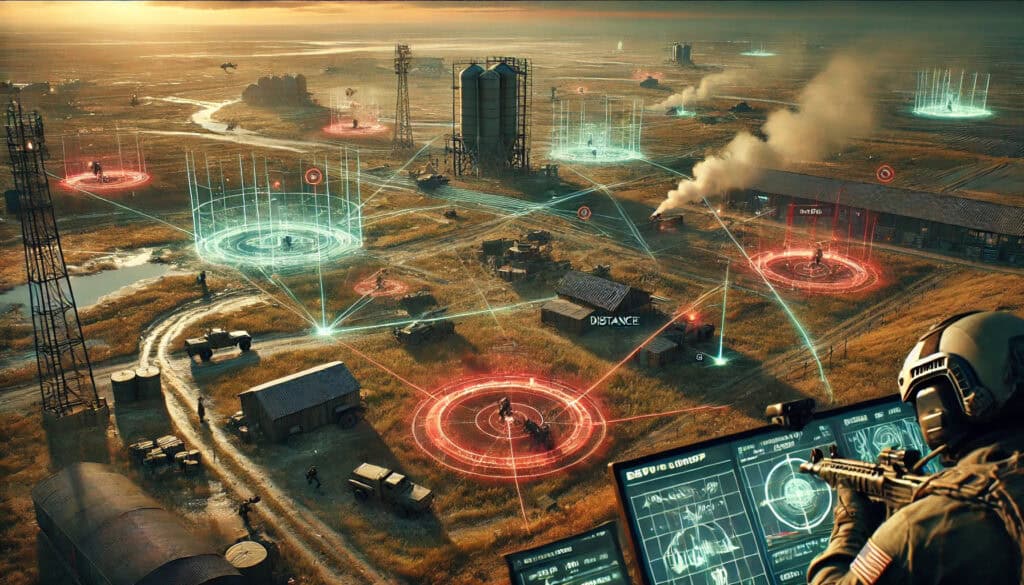
Using ESP cheats in COD Warzone insights

ESP isn’t just about tracking enemies – it also offers customization options to refine how information is displayed, making it more efficient and less overwhelming. Players can customize ESP settings to highlight only the most relevant data.

Target Tracking Enhancements

Sign up to our newsletter to receive guides and cord-cutting tips for free.
  • Box ESP & Aimbot Target ESP – Highlights enemies in a visible frame, making them easier to track.
  • Visibility Check – Only displays enemies when they are in direct line of sight, reducing unnecessary clutter.

Loot & Equipment Awareness

  • Weapon & Full Loot ESP – Displays high-value weapons, armor, and equipment on the map.
  • Self-Revive ESP – Identifies downed enemies who still have the ability to self-revive, preventing surprise comebacks.

Custom Display Settings

  • Max ESP Distance Slider – Adjusts how far ESP can detect enemies and loot.
  • Full Color Changer – Customizes colors for different ESP elements, improving clarity based on preference.

Adjusting these settings helps players to cut through unnecessary details and focus on the most useful information, making ESP more precise and practical in Warzone.

The Ethics and Risks of Using ESP in Call of Duty Warzone

While ESP provides undeniable advantages, it comes with significant risks and ethical concerns. Players who rely on ESP may gain an advantage, but they also face potential consequences from the game’s anti-cheat systems and the broader gaming community.

Fair Play vs. Competitive Advantage

  • ESP removes the need for traditional skills like map awareness and prediction.
  • Many argue that using ESP diminishes the integrity of Warzone’s competitive experience.

Detection Risks and Bans

  • Warzone’s anti-cheat system continuously evolves to detect and ban ESP users.
  • Hardware bans (HWID bans) make it difficult for players to return, even with new accounts.

The Evolution of Anti-Cheat Measures

  • Developers update detection methods regularly, making ESP use increasingly risky.
  • Reports from other players also contribute to account suspensions and bans.

ESP in Call of Duty Warzone eliminates the guesswork in engagements, giving players constant awareness of enemy positions and loot. Features like Wallhack, Healthbar ESP, and Visibility Checks make positioning and decision-making much easier. However, the risks of detection and bans continue to grow, making its use a risky choice for those looking to get ahead and beat the competition.

👋 Signup to our newsletter to receive guides and cord-cutting-tips tips for FREE!! Click Here!


Marketing permission: I give my consent to BestDroidPlayer to be in touch with me via email using the information I have provided in this form for the purpose of news, updates and marketing.

Legal disclaimer

BestDroidPlayer.com is in no way affiliated to any streaming application, apk or its addons. Also, we are not associated with the brands here shown as the references are only informative. Bestdroidplayer.com does not verify the legality or security of any apps, apks, addons or services mentioned on this site. We DO NOT HOST any copyright-protected software or streams and we DO NOT broadcast or provide any copyright-protected streams on this website - The content here provided is only informational and it should be used only to access content that is not protected by copyright. We strongly advise our readers to avoid piracy at all costs, if you decide to do so, it is your responsibility - We are not responsible for any of your activities.

If you wish to make a claim, please check our DMCA Notice Policy.

Filed Under: From the Community Tagged With: Call of Duty, enemy tracking, ESP, ESP in Warzone, extra sensory perception

Related guides

  • Tech

    To ESP or Not to ESP: Debating Fair Play in Call of Duty Warzone

    6 October 2023

  • Plex Guides

    Major 2025 Plex Updates: How Changes Impact Your Streaming Experience

    13 October 2025

  • From the Community

    Game Streaming vs. Movie Streaming: Key Technical Differences

    12 September 2026

  • Streaming Apps

    Don’t Nod Develops Narrative Game for Netflix’s Major IP

    28 October 2025

  • Firestick / Fire TV Tips, Guides and Tutorials

    Amazon’s Latest Fire TVs and 4K Select: A Game-Changer for Home Entertainment

    18 October 2025

  • Firestick / Fire TV Tips, Guides and Tutorials

    Amazon’s Game-Changer: Dive into the New Fire TV Lineup with Alexa+ Integration

    17 October 2025

Reader Interactions

Leave a Reply

Your email address will not be published. Required fields are marked *

This site uses Akismet to reduce spam. Learn how your comment data is processed.

Primary Sidebar

Search

Follow us

  • Facebook
  • Pinterest
  • Twitter

Featured Posts

Kodi Setup Guide

Most Complete Kodi Setup Guide: All you need to know to use Kodi

Latest Articles

BestDroidplayer article image about VPN issues on Firestick with TV screen and remote.

VPN Not Working on Firestick? 8 Easy Ways to Fix It

4th November 2026 By bestdroidplayer

BestDroidplayer Free99 movie app interface screenshot.

How to Install Free99 Kodi Addon (2026 Guide)

3rd November 2026 By bestdroidplayer

AI video editing scene with 3D character on monitor for streaming.

How 3D Assets Can Improve AI Video and Streaming Content

3rd November 2026 By bestdroidplayer

Person holding smartphone with eSIM app in front of Rome skyline.

What to Compare Before Buying an eSIM Data Plan in Europe

23rd October 2026 By bestdroidplayer

bestdroidplayer

Tested guides for Kodi, Fire TV, Android TV and streaming apps, in English, Portuguese and French since 2014.

We host no files and are not affiliated with any app or addon we cover. Only stream content you have the rights to.

Menu

  • Homepage
  • About Us
  • All Posts
  • Bestdroidplayer FAQ
  • DMCA Notice Policy
  • Affiliate Disclosure
  • Disclaimer
  • Privacy Policy
  • Cookie Policy
  • Advertise with us – Banner Ads
  • Get in Touch
  • HTML Sitemap

About Us

Bestdroidplayer it’s a blog with News, Tips, and Tutorials about the streaming industry.
In this blog, you will find useful tips to cut the cord and save some bucks while you get the best streaming experience.

Read more about us here.

Legal Disclaimer

BestDroidPlayer.com is in no way affiliated to any streaming application, apk or its addons. Also,  we are not associated with the brands here shown as the references are only informative. Bestdroidplayer.com does not verify the legality or security of any apps, apks, addons or services mentioned on this site. We DO NOT HOST any copyright-protected software or streams and we DO NOT broadcast or provide any copyright-protected streams on this website – The content here provided is only informational. We strongly advise our readers to avoid piracy at all costs, if you decide to do so, it is your responsability – We are not responsible for any of your activities.

Copyright © 2026 Bestdroidplayer

EnglishPortuguêsFrançais

We value your privacy

We use cookies for statistics (Google Analytics) to see which guides help our readers. You can accept or refuse: the site works the same either way. Cookie policy