• Skip to main navigation
  • Skip to main content
  • Skip to primary sidebar
  • Skip to footer
bestdroidplayer
  • Free Guides
  • Free Tools
    • Streaming Bitrate Calculator
  • Kodi
    • Kodi Guide
    • Best Kodi Addons
    • Best Sports Kodi Addons
      • Best Football (Soccer) Kodi Addons
      • Best NFL Kodi Addons
      • Best Cricket Kodi Addons
      • Best UFC / MMA Kodi Addons
      • Best WWE Kodi Addons
    • Best Movie Kodi Addons
    • Best Live TV Addons
    • Addons List
      • Live Sports Addons
        • Install TvTap Addon
        • Install Sportowa TV Addon
        • Install Rising Tides Addon
        • Install SportHD Addon
        • Install Fight Club Addon
      • Movies & TV Shows
        • Install Exodus Redux Addon
        • Install Magic Dragon Addon
        • Install Covenant Addon
        • Install Tempest Addon
        • Install TAZ Addon
        • Install Seren Addon
        • Install The Promise Addon
        • Install EnterTain Me Addon
        • Install The Crew Addon
        • Install Nightwing Addon
        • Install Black Lightning Addon
        • Install Shadow Addon
        • Install Asgard Addon
      • Live TV Addons
        • Install TvTap/TapTv Addon
        • Install LiveNet TV Addon
        • Install The Crew Addon
        • Install USGoTv Addon
        • Install Asgard Addon
        • Install RBTv Addon
        • Install Centry Sports Addon
    • Fix Kodi Errors
    • More Kodi Articles
  • Stremio
    • Stremio Beginner Guide
    • How to Install Stremio on FireStick
    • How to Install Stremio on Android TV Box
    • How to Install Stremio Addons
    • Best Stremio Addons
  • Plex
    • Plex Channels (Overall)
    • Plex Channels for Movies
    • Plex Channels for Sports
    • Plex Channels for Kids
  • Fire TV Stick
    • How to Set Up Amazon Fire Stick
    • How to Jailbreak Amazon Firestick
    • Best Apps for Jailbroken Firestick
    • How to Get Local Channels on Firestick
    • Best IPTV Players for Firestick
    • Install Kodi on Fire TV Stick
    • Update Kodi on Fire TV Stick
    • Install a VPN on Fire TV Stick
    • Best Free VPN for Firestick & Fire TV
    • More Firestick Articles
  • VPN
    • Best VPN for Kodi
    • Free VPN for Android TV Box
    • Free VPN for Firestick & Fire TV
    • What you can do with a VPN
  • EN
  • PT
  • FR
  • EN
  • PT
  • FR
  1. Home
  2. Cyber Security
  3. Net Neutrality Repeal – Restore the Internet Freedom

Net Neutrality Repeal – Restore the Internet Freedom

J

Last updated 12 January 2018 by Justin

If you are an internet enthusiast or you keep up with the latest news, then you might have come across the terms Net neutrality. Learn here more about the Net Neutrality Repeal and How to Restore the Internet Freedom.
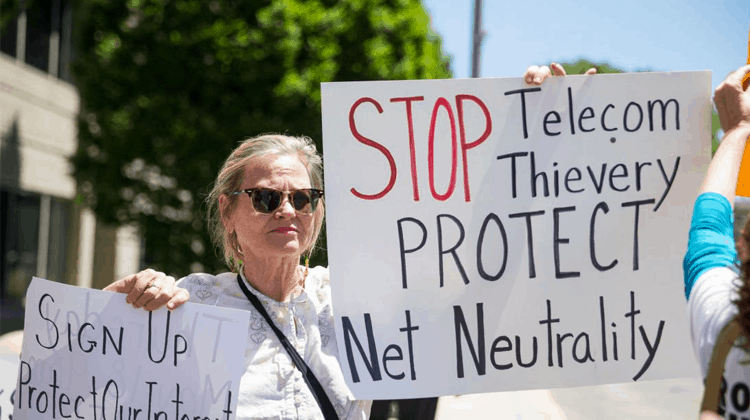
Net Neutrality Repeal

Bestdroidplayer.com is a reader-supported blog. If you buy a VPN or an Amazon product through our links, we may earn a commission that helps maintaining our blog. Our reviews are totally honest and we only recommend trusted VPN and ecommerce brands. Full affiliate disclosure

Contents hide
1. What is net neutrality
2. Why repeal net neutrality rules
3. The impact
4. What can be done next
5. How to protect your privacy after net neutrality

If you are an internet enthusiast or you keep up with the latest news, then you might have come across the terms Net neutrality, the Federal Communications Commission (FCC) and even Mr. Ajit Pai in the past weeks. People who are not internet-minded may wonder what the debate is all about and why does it matter. Net neutrality came into the limelight in 2015 when it came into effect. This year, Net neutrality is also in the spotlight due to a series of events. The major ones started when the FCC Chairman Mr. Pai proposed net neutrality to be repealed. The other major event occurred on Thursday 14th December after a three to two vote which led to the net neutrality repeal.

What is net neutrality

Net neutrality is a set of principles that ensure free and fair services from broadband and internet service providers. Net neutrality prohibits ISPs from seeing what we do online, controlling the internet in terms of service. Now that the net neutrality has been repealed, the opposite is bound to happen. That is, ISPs can block websites, introduce packages for service quality purposes and even slow down the service for some companies. In a nutshell, after it takes effect, its expected that the internet will lose the freedom that comes with it. We are going buy the freedom in order to access certain aspects. As for the general internet such as social media, everything will be just normal.

Why repeal net neutrality rules

Before the vote was undertaken, the FCC chairman defended the repeal. Mr. Pai believes abolishing net neutrality will give way to more developments that will benefit the consumers. “We are helping consumers and promoting competition,” Mr. Pai said. “Broadband providers will have more incentive to build networks, especially to underserved areas.” The chairman referred to the repeal as “restoring internet freedom,” and this will help ISPs to offer a variety of options and also invest in faster technologies to deliver internet. The vote reclassifies ISPs and broadband providers under information service and not under the telecommunication service. This means that the FCC will no longer regulate the ISPs and the role has been passed on to the Federal Trade Commission (FTC).

Under the repeal, ISPs are expected to disclose what they will be doing to the consumers. It will be the responsibility of the FTC to oversee if disclosure has been done when ISPs will be doing the ‘injustices’ which net neutrality eliminated.

The impact

Now that you know what net neutrality is, you can guess the impact of its vice versa. The most anticipated outcome is that the ISPs will start to segment the internet. Like segmentation in commerce, some services will be given priority; others charged exorbitantly and other injustices including zero privacy. Since broadband providers will be determining what you can access and the frequency at which you access the content, they will start throttling and blocking your most wanted service in order for you to pay more. This will come as special packages in which you’ll have to subscribe to if you wish to access the content at your normal rate. Imagine how much you’re going to pay up if you like streaming your content online.

If the ISP knows what you are doing, this will lead to another injustice known as retargeting. As your ISP is monitoring your data and content, soon they will know what your preferences are through behavioral targeting. When this is achieved, you will start experiencing an influx of advertisements even the ones that you don’t have an interest in.

Another impact that will affect you is that your data may also be at risk. Since the advertising realm has a lot of money, your ISP may sell your data which they acquired via retargeting to companies who cough up the most money. This may also give rise to other risks such as breaches in privacy and other threats.

What can be done next

Even though it will take weeks before the repeal takes effect fully, internet-minded people are already prepared to defend what’s best for everyone, net neutrality. Before the vote, protesters were outside the FCC building to oppose the change. They argued that the repeal will make the internet less open and less accessible. Democrat Commissioner Mignon Clyburn also had similar thoughts, “I dissent to this legally-lightweight, consumer-harming, corporate-enabling, destroying-internet freedom order.” Since the vote went through, there are still other remaining options are still being utilized. For instance, New York’s attorney general Eric Schneiderman said that he would lead a lawsuit against the repeal. Other net neutrality supporters have also vowed to overturn the repeal using the same route; a lawsuit.

Sign up to our newsletter to receive guides and cord-cutting tips for free.

What can you do? If you can’t file a lawsuit, you can support team internet that in turn supports net neutrality and freedom of speech. To do that, head over to battle for the net and vote for an open internet.

How to protect your privacy after net neutrality

The best shot you have at the moment that will guarantee your privacy and the previous net neutrality benefits is via a Virtual Private Network (VPN). And not just any VPN, a VPN that stands for online freedom and supports net neutrality. Here is a walkthrough on how a VPN will guarantee your privacy.

When you connect through a VPN, your traffic is encrypted and then tunneled through the specified VPN server. This means that your ISP won’t be able to snoop on you and then you will eliminate all the injustices that come with it.

Although there are many VPNs, there’s one that will truly fit this position; IPVanish. This is because IPVanish stands for your freedom and this is manifested in many ways. For instance, IPVanish has a zero-log policy which means that none of your online activities will be logged in their servers. Therefore, even if a court order is issued that requires your information to be given out, they will have nothing to give out. After all, you don’t give what you don’t have.

You can get 81% discount of IPVanish following this link, this is the best promo code we found for you.

👋 Signup to our newsletter to receive guides and cord-cutting-tips tips for FREE!! Click Here!


Marketing permission: I give my consent to BestDroidPlayer to be in touch with me via email using the information I have provided in this form for the purpose of news, updates and marketing.

Legal disclaimer

BestDroidPlayer.com is in no way affiliated to any streaming application, apk or its addons. Also, we are not associated with the brands here shown as the references are only informative. Bestdroidplayer.com does not verify the legality or security of any apps, apks, addons or services mentioned on this site. We DO NOT HOST any copyright-protected software or streams and we DO NOT broadcast or provide any copyright-protected streams on this website - The content here provided is only informational and it should be used only to access content that is not protected by copyright. We strongly advise our readers to avoid piracy at all costs, if you decide to do so, it is your responsibility - We are not responsible for any of your activities.

If you wish to make a claim, please check our DMCA Notice Policy.

Affiliate disclosure: Bestdroidplayer.com is a reader-supported blog. If you buy a VPN or an Amazon product through our links, we may earn a commission that helps maintaining our blog. Our reviews are totally honest and we only recommend trusted VPN and ecommerce brands.

Filed Under: Cyber Security

Related guides

  • Streaming Apps

    Top 10 Best CineB Net Alternatives: Free Movies & TV Shows

    5 July 2022

  • From the Community

    7 Clues Your Firestick Is Slowing Down (And It’s Not Just Your Internet)

    28 April 2026

  • Tech

    Does A VPN Help With Internet Speed?

    9 July 2023

  • Tech

    Understanding the Basics of the Internet of Things & How Does it Work?

    1 February 2023

  • Streaming devices

    Does Roku Need Internet Connection to Work? (5 Easy Steps)

    28 December 2022

  • Best VPN services

    7 Best Free & Paid VPNs for Windows 10 to Protect Your Activities on Internet

    11 July 2019

Reader Interactions

Leave a Reply

Your email address will not be published. Required fields are marked *

This site uses Akismet to reduce spam. Learn how your comment data is processed.

Primary Sidebar

Search

Follow us

  • Facebook
  • Pinterest
  • Twitter

Featured Posts

Kodi Setup Guide

Most Complete Kodi Setup Guide: All you need to know to use Kodi

Latest Articles

BestDroidplayer article image about VPN issues on Firestick with TV screen and remote.

VPN Not Working on Firestick? 8 Easy Ways to Fix It

4th November 2026 By bestdroidplayer

BestDroidplayer Free99 movie app interface screenshot.

How to Install Free99 Kodi Addon (2026 Guide)

3rd November 2026 By bestdroidplayer

AI video editing scene with 3D character on monitor for streaming.

How 3D Assets Can Improve AI Video and Streaming Content

3rd November 2026 By bestdroidplayer

Person holding smartphone with eSIM app in front of Rome skyline.

What to Compare Before Buying an eSIM Data Plan in Europe

23rd October 2026 By bestdroidplayer

bestdroidplayer

Tested guides for Kodi, Fire TV, Android TV and streaming apps, in English, Portuguese and French since 2014.

We host no files and are not affiliated with any app or addon we cover. Only stream content you have the rights to.

Menu

  • Homepage
  • About Us
  • All Posts
  • Bestdroidplayer FAQ
  • DMCA Notice Policy
  • Affiliate Disclosure
  • Disclaimer
  • Privacy Policy
  • Cookie Policy
  • Advertise with us – Banner Ads
  • Get in Touch
  • HTML Sitemap

About Us

Bestdroidplayer it’s a blog with News, Tips, and Tutorials about the streaming industry.
In this blog, you will find useful tips to cut the cord and save some bucks while you get the best streaming experience.

Read more about us here.

Legal Disclaimer

BestDroidPlayer.com is in no way affiliated to any streaming application, apk or its addons. Also,  we are not associated with the brands here shown as the references are only informative. Bestdroidplayer.com does not verify the legality or security of any apps, apks, addons or services mentioned on this site. We DO NOT HOST any copyright-protected software or streams and we DO NOT broadcast or provide any copyright-protected streams on this website – The content here provided is only informational. We strongly advise our readers to avoid piracy at all costs, if you decide to do so, it is your responsability – We are not responsible for any of your activities.

Copyright © 2026 Bestdroidplayer

EnglishPortuguêsFrançais

We value your privacy

We use cookies for statistics (Google Analytics) to see which guides help our readers. You can accept or refuse: the site works the same either way. Cookie policy