Step-by-step guide to install Free99 addon on Kodi. Learn how to set up Free99 Repo and stream movies, TV shows, and more.
Bestdroidplayer.com is a reader-supported blog. If you buy a VPN or an Amazon product through our links, we may earn a commission that helps maintaining our blog. Our reviews are totally honest and we only recommend trusted VPN and ecommerce brands. Full affiliate disclosure
Looking for a free, all-in-one Kodi addon that combines movies, TV shows, live TV, and sports under one roof? The Free99 Kodi addon has quickly become a go-to option for cord-cutters who want a massive content library without spending a dime. Hosted in the Diggz Repository, Free99 is a redesigned fork of the popular Scrubs addon with modified scrapers engineered to pull free links faster and more efficiently.
In this guide, we’ll walk you through everything you need to know about Free99 — what it is, what it offers, and most importantly, how to install it on Kodi step by step. Whether you’re running Kodi 21 Omega on a Firestick, Android TV box, or your PC, this tutorial has you covered. We’ve also included a few tips to help you get the most out of the addon, including why pairing it with a VPN is a smart move for safe streaming.
Disclaimer: This guide is for educational and informational purposes only. BestDroidPlayer.com does not promote, condone, or encourage piracy or the use of any addon to access copyrighted content illegally. Always ensure you are streaming content that is legally available in your region.
What is Free99 Kodi Addon?
Free99 is a Kodi video addon hosted in the Diggz Repository, a popular third-party repository maintained by the Diggz team. The addon functions as a fork of Scrubs, a well-known free-links addon that has been a favorite in the Kodi community for years. What sets Free99 apart is its modified scraper system, which has been tuned specifically to locate and retrieve free streaming links more quickly than the original Scrubs build.
The addon is organized into several intuitive sections, including Browse Movies, Browse TV Shows, and Tools, along with a variety of sub-menus that make navigation straightforward. Free99 is compatible with Kodi 21 Omega and works across a wide range of devices, from Amazon Firestick and Fire TV to Android TV boxes, Windows PCs, and more. It’s worth noting that, like most free-link addons, the streams are sourced from public servers and may require some patience — you may need to try several links before finding one that plays smoothly.
If you’re familiar with other free-links Kodi addons, you’ll feel right at home with Free99. It’s designed for users who want a broad catalog of content organized in a simple, user-friendly layout without the fuss of premium subscriptions. If you’re also exploring other options, check out our roundup of the 15 best Kodi movie addons still working in 2026 for more excellent choices.
Free99 Kodi Addon Features
Free99 packs a surprising amount of functionality into a single addon. Here are the standout features you can expect after installation:
- Extensive movie library with free streaming links across multiple genres, including action, comedy, drama, horror, and more.
- TV show section featuring popular series and full seasons with multiple source options for each episode.
- Live TV channels spanning news, entertainment, lifestyle, and general programming categories — ideal for cord-cutters looking for free live content.
- Dedicated sports section with links to live sporting events and match replays, making it a handy companion for sports fans.
- Modified scrapers inherited from Scrubs but optimized for faster link retrieval and improved success rates.
- Built-in Tools section that provides utility features for managing and configuring the addon to your liking.
- Clean, organized interface with intuitive sub-menus that make browsing content simple, even for first-time Kodi users.
- Compatibility with Kodi 21 Omega and most popular Kodi-compatible devices, including Firestick, Android TV, and Windows.
For sports enthusiasts, Free99’s live sports options pair nicely with the best football (soccer) Kodi addons for catching matches from around the world. And if live TV is your primary interest, you may also want to explore our guide to the best working Kodi live TV addons in 2026.
⚠️ Important: Use a VPN with Kodi
Your ISP can see everything you stream on Kodi. To protect your privacy and avoid potential issues, we strongly recommend using a VPN.
How to Install Free99 Kodi Addon
Installing Free99 requires adding the Diggz Repository to Kodi first, then installing the addon from that repository. The process takes about five minutes, but you’ll need to make sure Unknown Sources is enabled in your Kodi settings. Follow the steps below carefully — we’ve included screenshot descriptions at each step to help you follow along.
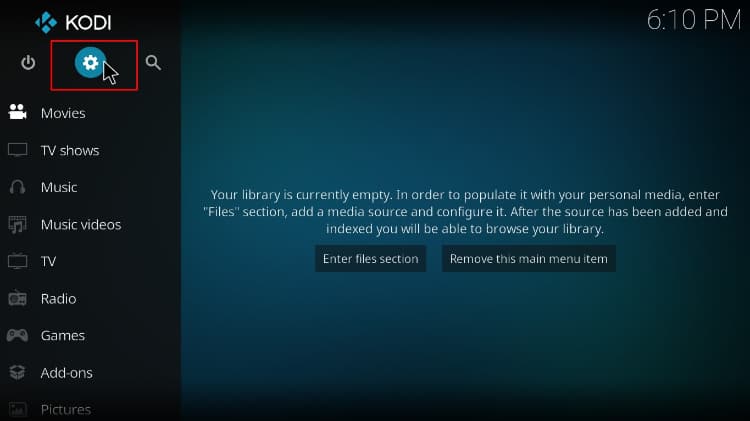
- Open Kodi and click the Settings gear icon.

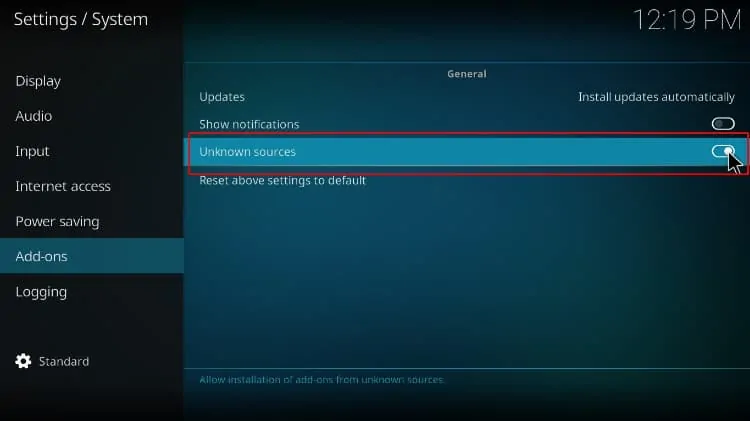
- Go to System, select Add-ons, and toggle Unknown Sources on.
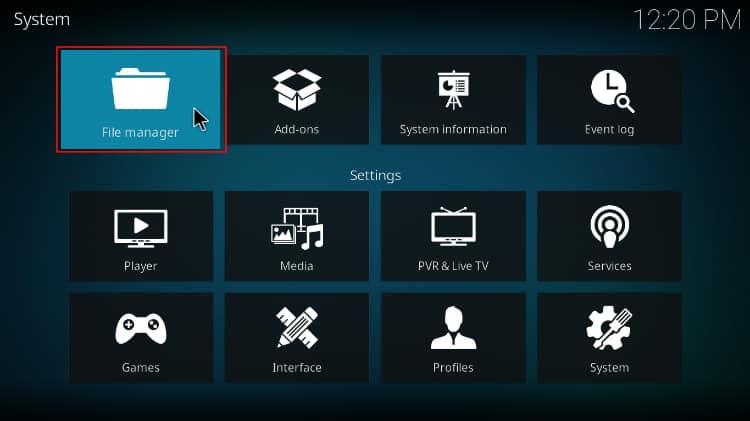
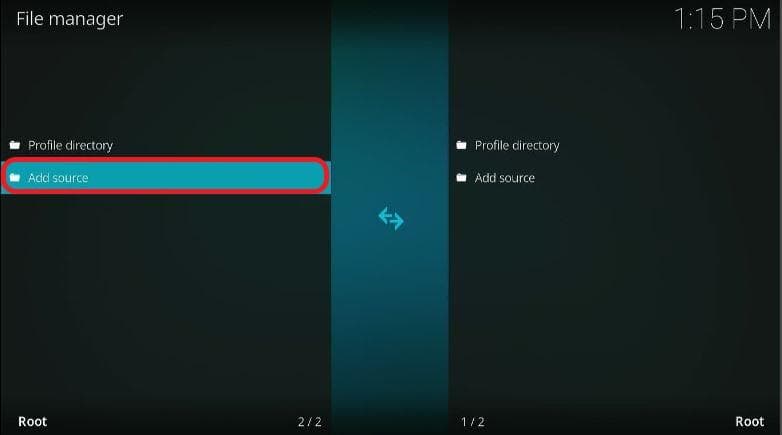
- Go back to Settings and open File Manager.
- Click Add Source.

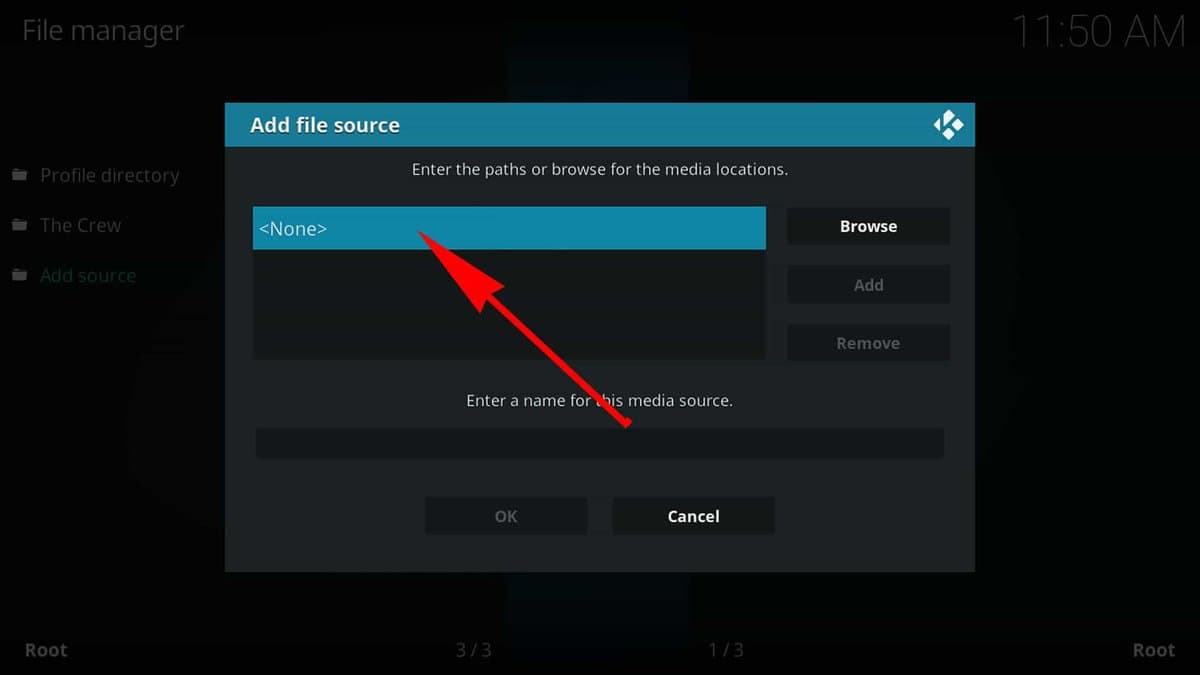
- Click <None>, type the repo URL https://nebulous42069.github.io/diggz/, name the source Free99 Repo, and click OK.

- Go back to the Home screen.
💡 Tip: Make sure you’re connected to a VPN before proceeding — it keeps your streaming private.
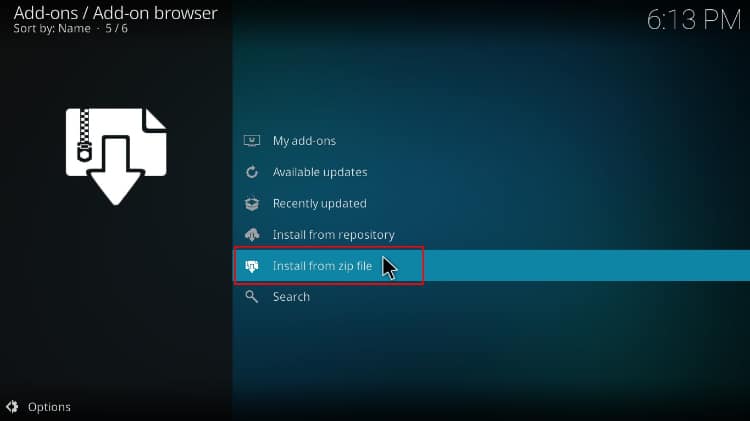
- Go to Add-ons and select Install from zip file.
- Select the Free99 Repo source and install the repository zip file.
- Wait for the Add-on installed notification.
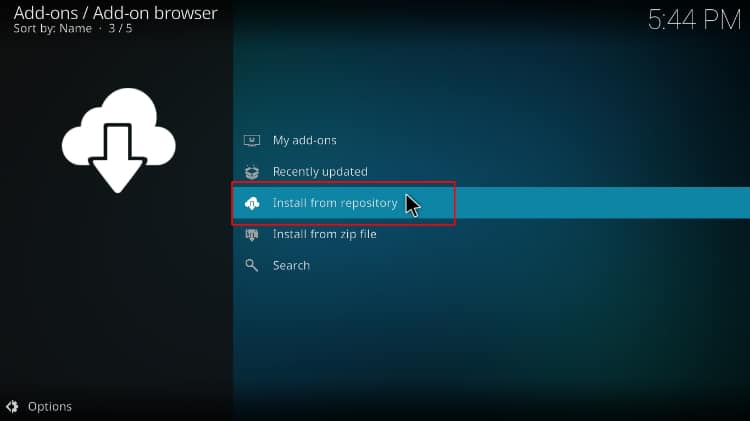
- Go to Install from repository.
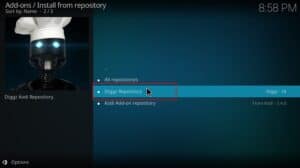
- Select the Diggz Repository.
- Go to Video add-ons.
- Select Free99, click Install, and wait for the notification.
Once the installation is complete, you’ll find Free99 in your Kodi Add-ons section under Video add-ons. Launch it, browse through the categories, and start exploring everything it has to offer. If you’re installing on a Firestick, you may also want to check out our guide to the best apps for jailbroken Firestick in 2026 for even more streaming options.
Frequently Asked Questions
Yes, Free99 is fully compatible with Kodi 21 Omega. It is hosted in the Diggz Repository, which has been updated to support the latest Kodi version. If you are running an older version of Kodi, you may need to upgrade to Kodi 21 Omega before installing Free99.
Free99 uses free links sourced from public servers, which means they can change frequently, get removed, or become unavailable without notice. Many users find that trying a few different links usually yields a working stream. Patience is key when using any free-links Kodi addon.
Free99 itself is a legal piece of software. However, the legality of the content you stream depends on your location and the source of the streams. Always ensure you are accessing content that is legally available in your region, and consider using a VPN to protect your privacy.
While a VPN is not strictly required to use Free99, it is strongly recommended. A VPN encrypts your connection and hides your streaming activity from your ISP, adding a layer of privacy and security. Check out our guide to the best free VPN for Firestick and Fire TV for affordable options.
Free99 is a fork of Scrubs, meaning it shares the same core codebase but has been modified. The main difference is the scraper system, which has been redesigned to locate free links more quickly and efficiently. This results in faster link retrieval and a smoother browsing experience compared to the original Scrubs.
Conclusion
Free99 is a solid choice for Kodi users who want a broad range of free content in one convenient package. Its combination of movies, TV shows, live TV, and sports — all backed by the improved scrapers from its Scrubs heritage — makes it a versatile addition to any Kodi setup. The installation process is straightforward, and once you’ve added the Diggz Repository, you can easily install Free99 and start exploring its extensive catalog.
As with any Kodi addon that pulls free links, remember that streams may be inconsistent and that patience often pays off. For the best experience, we recommend pairing Free99 with a reliable VPN like IPVanish to keep your streaming activity private and secure. If you’re looking for more ways to expand your Kodi setup, be sure to check out our guide to the best free VPN options for Firestick and Fire TV in 2026.
Still have questions about Free99 or other Kodi addons? Drop a comment below or explore our growing library of Kodi tutorials and guides. Happy streaming, and stay safe out there!




Leave a Reply