• Skip to main navigation
  • Skip to main content
  • Skip to primary sidebar
  • Skip to footer
bestdroidplayer
  • Free Guides
  • Free Tools
    • Streaming Bitrate Calculator
  • Kodi
    • Kodi Guide
    • Best Kodi Addons
    • Best Sports Kodi Addons
      • Best Football (Soccer) Kodi Addons
      • Best NFL Kodi Addons
      • Best Cricket Kodi Addons
      • Best UFC / MMA Kodi Addons
      • Best WWE Kodi Addons
    • Best Movie Kodi Addons
    • Best Live TV Addons
    • Addons List
      • Live Sports Addons
        • Install TvTap Addon
        • Install Sportowa TV Addon
        • Install Rising Tides Addon
        • Install SportHD Addon
        • Install Fight Club Addon
      • Movies & TV Shows
        • Install Exodus Redux Addon
        • Install Magic Dragon Addon
        • Install Covenant Addon
        • Install Tempest Addon
        • Install TAZ Addon
        • Install Seren Addon
        • Install The Promise Addon
        • Install EnterTain Me Addon
        • Install The Crew Addon
        • Install Nightwing Addon
        • Install Black Lightning Addon
        • Install Shadow Addon
        • Install Asgard Addon
      • Live TV Addons
        • Install TvTap/TapTv Addon
        • Install LiveNet TV Addon
        • Install The Crew Addon
        • Install USGoTv Addon
        • Install Asgard Addon
        • Install RBTv Addon
        • Install Centry Sports Addon
    • Fix Kodi Errors
    • More Kodi Articles
  • Stremio
    • Stremio Beginner Guide
    • How to Install Stremio on FireStick
    • How to Install Stremio on Android TV Box
    • How to Install Stremio Addons
    • Best Stremio Addons
  • Plex
    • Plex Channels (Overall)
    • Plex Channels for Movies
    • Plex Channels for Sports
    • Plex Channels for Kids
  • Fire TV Stick
    • How to Set Up Amazon Fire Stick
    • How to Jailbreak Amazon Firestick
    • Best Apps for Jailbroken Firestick
    • How to Get Local Channels on Firestick
    • Best IPTV Players for Firestick
    • Install Kodi on Fire TV Stick
    • Update Kodi on Fire TV Stick
    • Install a VPN on Fire TV Stick
    • Best Free VPN for Firestick & Fire TV
    • More Firestick Articles
  • VPN
    • Best VPN for Kodi
    • Free VPN for Android TV Box
    • Free VPN for Firestick & Fire TV
    • What you can do with a VPN
  • EN
  • PT
  • FR
  • EN
  • PT
  • FR
  1. Home
  2. Kodi News, Tips, Tutorials and Guides
  3. Kodi Addons Install Guides
  4. How to Install Crazy Canucks Kodi Addon: High-Quality Movies & TV Shows

How to Install Crazy Canucks Kodi Addon: High-Quality Movies & TV Shows

JT

Last updated 18 October 2022 by Joel Timothy

How to Install Crazy Canucks Kodi Addon: High-Quality Movies & TV Shows

Bestdroidplayer.com is a reader-supported blog. If you buy a VPN or an Amazon product through our links, we may earn a commission that helps maintaining our blog. Our reviews are totally honest and we only recommend trusted VPN and ecommerce brands. Full affiliate disclosure

Contents hide
1. Stay Safe While Streaming!
2. How to Install Crazy Canucks Kodi Addon
3. How to Setup Real Debrid on Crazy Canucks Addon

This guide shows step-by-step instructions on how to install Crazy Canucks Kodi addon. The guide applies to all the devices that support Kodi, including Firestick, android TV sticks/boxes, Chromecast, and NVidia Shield.

Crazy Canucks is an awesome Kodi addon provided by the Canucks Repository, and it’s a fork of the popular Shadow Kodi addon. The addon gives you access to tons of movies, TV shows, and Youtube content. The content is well arranged into different categories on the main interface: TV shows, Movies, Last Link Played, Search History, Search, Trakt, Resume Watching, RD Torrents, My RD History, Settings, The Crazy Canuck, and Odin.

One of the addon’s best features is its content layout. The home page’s main categories are well-subdivided, making navigating through Crazy Canucks add-on much simpler. For example, once you click on the movies section, you will find different subcategories: Theaters, Released Movies, Years, Genre, Popular Movies, Western Movies, Classic Movies, and so on. On top of that, you also get inbuilt access to Odin, one of the best Kodi addons, which is free and doesn’t require external services to play.

The crazy Canucks addon provides links using premium scrappers like Real Debrid, Premiumize, and All Debrid. These provide high-quality links, and you can stream up to 4K content. Also, you can integrate your trakt account to track your watch history.

Stay Safe While Streaming!

Your ISP and government can always see what you are accessing online and tell when you illegally access pirated content. It’s, therefore, important to be careful when using third-party Kodi addons as they don’t host the content they provide access to. And in some cases, the content is pirated.

👉 If you don’t want to end up with a DMCA or cease-and-desist letter, we strongly suggest that you use a reliable VPN when streaming. The VPN will encrypt your activities to make them private and spoof your IP address to make you anonymous.

The Recommended VPN

The best VPN for Kodi is IPVanish, and it has been for a while. Here’s why:

  • ⚡ Superb Speeds: Guarantees a smooth live streaming experience.
  • 🌍 Huge Server Network: You can connect to a nearby server for a fast and stable connection.
  • 🔑Unblock Anything: Safe access to censored apps, websites and torrent sites.
  • 😎 Best in Privacy: The VPN doesn’t keep any activity logs, and so your activities are only known to you.
  • 🔐 Top-notch Security: This VPN uses AES 256-bit encryption and provides multiple protocols alongside other security features such as a kill switch, DNS & IPv6 protection and WireGuard.
  • 💳 30 Days RISK FREE Money-Back Guarantee: In case you do not like the service, you can get every penny back if you cancel within 30 days!
You can get IPVanish at 81% off using our exclusive discount below!

😃 Get 81% of IPVanish, now!

How to Install Crazy Canucks Kodi Addon

To install Crazy Canucks Kodi addon, we’ll first need to enable installation from “unknown sources.”

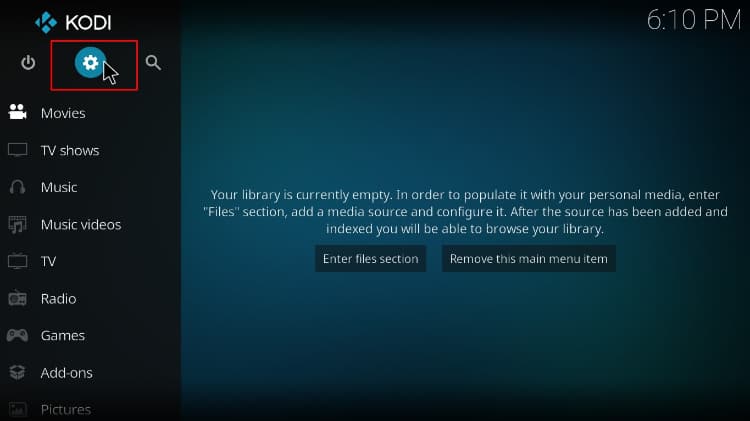
  1. Click on the Settings gear icon on the Kodi main page.
    Select Settings button on Kodi
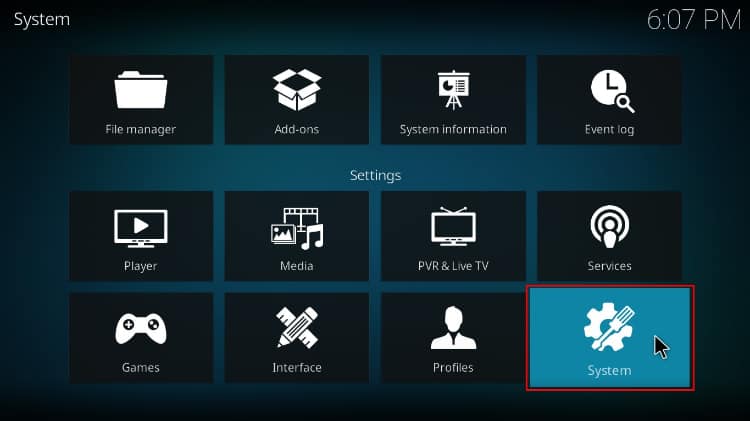
  2. Select System.
    Select to access Kodi system
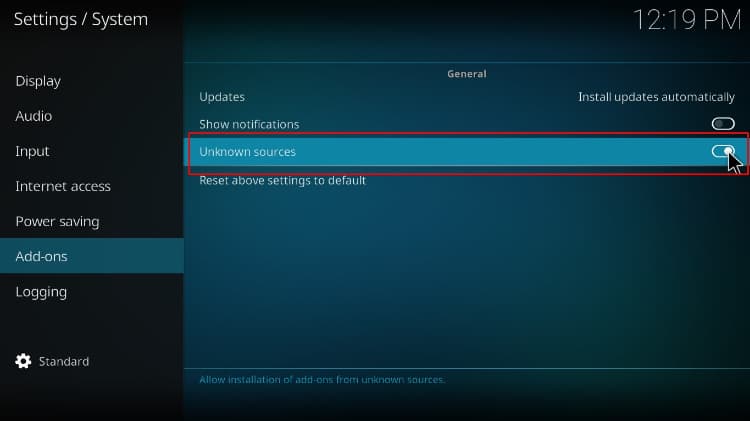
  3. Hover over Addons and enable Unknown Sources.
    Activate Unknown sources on Kodi

We can now install Crazy Canucks Kodi Addon.

Add Crazy Canucks Repo Source

To install Crazy Canucks Kodi addon, we’ll need to integrate the Crazy Canucks repository. But,

Warning:

✋ Before that, you need to turn on a reliable VPN like IPVanish to avoid ISP blocks.

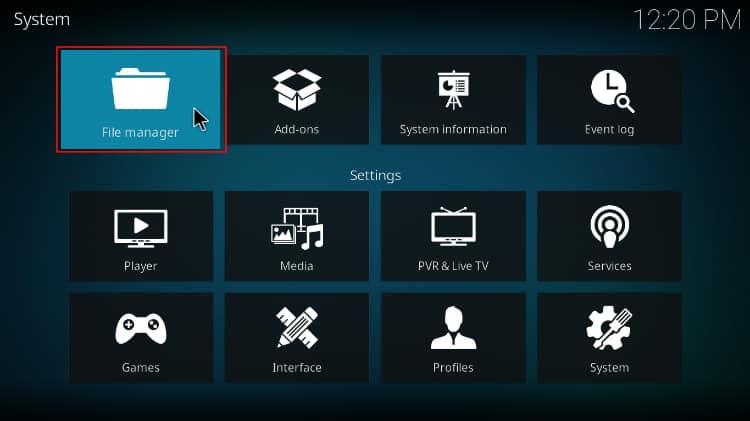
  1. From there, go back to Settings and open File Manager.
    Select File manager to access sources on Kodi
  2. Double-click “Add-Source” and type in the URL http://twiglet.esy.es/canuck into the window that opens. “Canuck” will be inserted in the textbox below. Click “OK.”
    Crazy Canuck Kodi addon source

Install Crazy Canucks Repository

Now, we can use the added source to install the Canuck Repository.

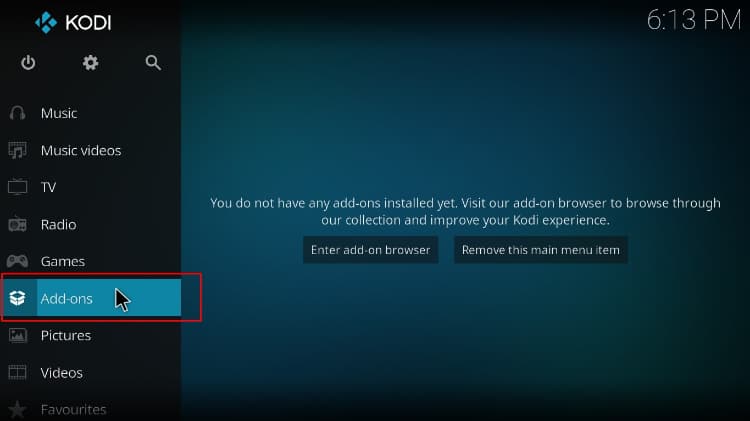
  1. Go back to the Kodi home screen and click “Add-ons” on the left-hand side menu.
    Select Add-ons from the left menu on Kodi homepage
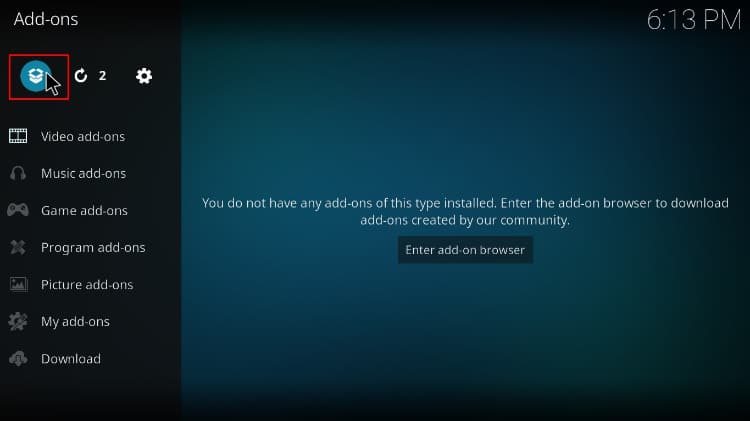
  2. On the top left side of the screen, click the open box icon.
    Select the package installer button on Kodi
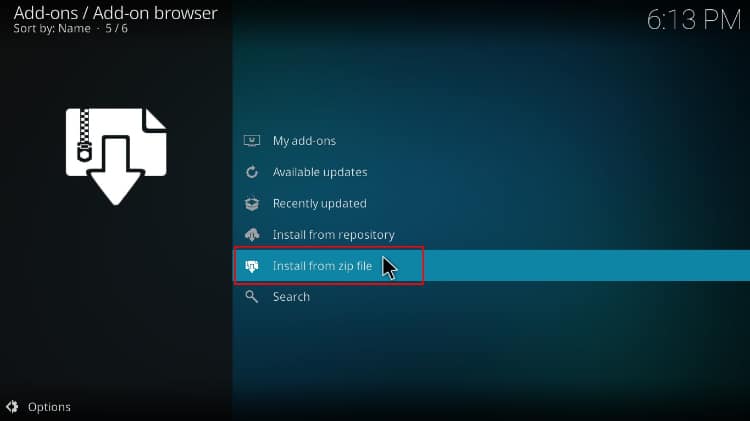
  3. Select “Install from Zip File.”
    Select install from zip file on Kodi
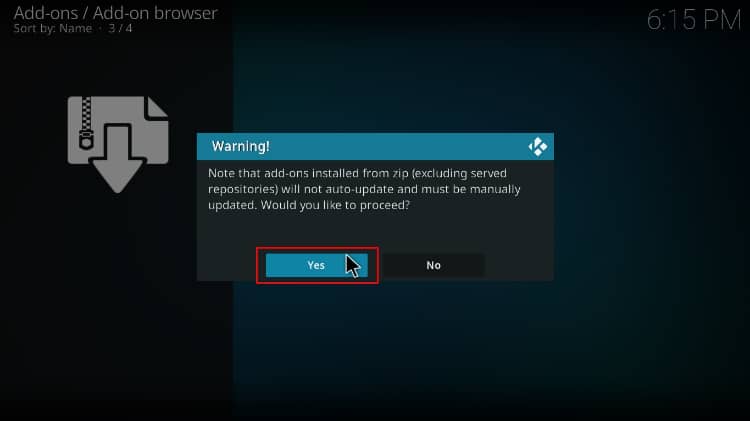
  4. This will prompt a warning, just click “Yes.”
    Kodi 19 zip file warning
  5. Select “Canuck.”
    Crazy Canuck install from zip file
  6. Click on repository.canuck-x.x.x.zip.
    Crazy Canuck zip file
  7. You will receive a notification in the upper right side of your screen when the repo installs successfully.
    Crazy Canuck repository installed

Install Crazy Canucks Kodi Addon

Finally, we can install the Crazy Canucks Kodi addon.

Sign up to our newsletter to receive guides and cord-cutting tips for free.
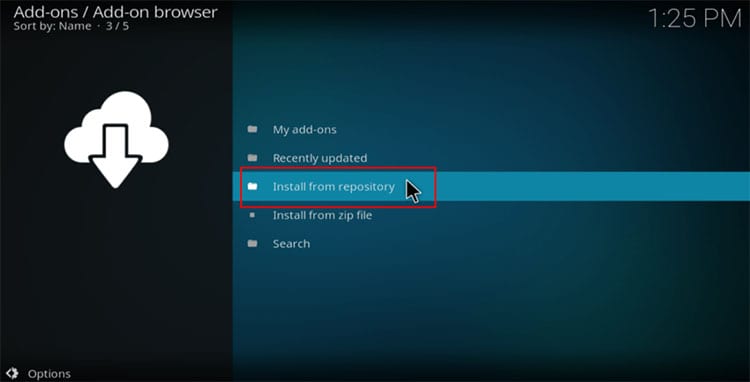
  1. While on the same page, click “Install from repository.”
    Select install from repository on Kodi
  2. Select “Canuck Repository”
    Canuck repo option
  3. Click on “Video Add-ons” and then “Crazy Canucks.”
    Crazy Canucks video addon option
  4. You will now see an “Install” option. Hit it.
    install Crazy Canucks Kodi addon option
  5. After completing the installation, you’ll get an installation notification message.
    Crazy Canucks kodi addon installed

Congratulations, you have successfully installed the Crazy Canucks addon. You can go ahead and explore it. Here’s the Crazy Canucks home page.

Crazy Canucks menu items

However, you won’t be able to stream yet as the Crazy Canucks addon requires Real-Debrid. You can check out the built-in section Odin or Homelander Kodi addon if you don’t have a premium account.

How to Setup Real Debrid on Crazy Canucks Addon

If you don’t have a real-debrid account, you’ll need to create one first. From there:

  1. Launch Crazy Canucks Kodi addon and select Settings on the lower side.
    Settings option
  2. Hover over Debrid Accounts and click Re-authorize.
    Enabling Real Debrid
  3. The crazy Canucks Kodi addon will now give you an authorization code. Note it somewhere.
    Crazy Canucks Debrid code
  4. Open your browser on the same device or a device on the same network and go to real-debrid.com/device. Input the provided code from the preview step and click Continue.
    Real Debrid device linking
  5. Finally, return to the Crazy Canucks addon, and you’ll see a Real-Debrid Authorization Successful notification. Click OK after that.
    Real Debrid authorized

You can now start streaming free movies on Crazy Canucks Kodi Addon!

Check out more Kodi addon installation guides.

Wrap Up

Crazy Canucks Kodi Addon is worth installing if you have a real-debrid account or any other premium link provider. You will find a wide selection of movies and TV shows you can watch and enjoy the addon’s content organization. However,

Warning:

Keep in mind that the third-party addon can lead to copyright infringement, so ensure you stay safe by firing up IPVanish before you start streaming.

Enjoy!
👋 Signup to our newsletter to receive guides and cord-cutting-tips tips for FREE!! Click Here!


Marketing permission: I give my consent to BestDroidPlayer to be in touch with me via email using the information I have provided in this form for the purpose of news, updates and marketing.

Legal disclaimer

BestDroidPlayer.com is in no way affiliated to any streaming application, apk or its addons. Also, we are not associated with the brands here shown as the references are only informative. Bestdroidplayer.com does not verify the legality or security of any apps, apks, addons or services mentioned on this site. We DO NOT HOST any copyright-protected software or streams and we DO NOT broadcast or provide any copyright-protected streams on this website - The content here provided is only informational and it should be used only to access content that is not protected by copyright. We strongly advise our readers to avoid piracy at all costs, if you decide to do so, it is your responsibility - We are not responsible for any of your activities.

If you wish to make a claim, please check our DMCA Notice Policy.

Affiliate disclosure: Bestdroidplayer.com is a reader-supported blog. If you buy a VPN or an Amazon product through our links, we may earn a commission that helps maintaining our blog. Our reviews are totally honest and we only recommend trusted VPN and ecommerce brands.

Filed Under: Kodi Addons Install Guides Tagged With: Crazy Canucks Kodi Addon, HD, Kodi Addon install guide, Kodi addons, movies, TV Shows

JT

Written by

Joel Timothy

Joel is a cybersecurity expert with 7+ years of experience and is dedicated to helping achieve a safer, more private digital space. He aims to empower individuals and organizations with the knowledge and tools needed to protect their online presence.

All guides by JoelLinkedIn

Related guides

  • Kodi Addons Install Guides

    Installation Guide for Placenta Kodi Addon | TV Shows & Movies Addon

    4 June 2018

  • Kodi Addons Install Guides

    How to Install Quicksilver Kodi Addon: Free Movies & TV Shows

    13 May 2024

  • Kodi Addons Install Guides

    How to Install Luffy Kodi Addon: HD Movies & TV Shows

    4 December 2023

  • Kodi Addons Install Guides

    How To Install Twilight Kodi Addon: HD Movies & TV Shows

    4 December 2023

  • Kodi Addons Install Guides

    How to Install Zoro Kodi Addon: HD Movies & TV Shows

    2 November 2023

  • Kodi Addons Install Guides

    How to Install ChainsGenocide Kodi Addon: Free HD Movies & TV Shows

    4 July 2023

Reader Interactions

Leave a Reply

Your email address will not be published. Required fields are marked *

This site uses Akismet to reduce spam. Learn how your comment data is processed.

Primary Sidebar

Search

Follow us

  • Facebook
  • Pinterest
  • Twitter

Featured Posts

Kodi Setup Guide

Most Complete Kodi Setup Guide: All you need to know to use Kodi

Latest Articles

BestDroidplayer article image about VPN issues on Firestick with TV screen and remote.

VPN Not Working on Firestick? 8 Easy Ways to Fix It

4th November 2026 By bestdroidplayer

BestDroidplayer Free99 movie app interface screenshot.

How to Install Free99 Kodi Addon (2026 Guide)

3rd November 2026 By bestdroidplayer

AI video editing scene with 3D character on monitor for streaming.

How 3D Assets Can Improve AI Video and Streaming Content

3rd November 2026 By bestdroidplayer

Person holding smartphone with eSIM app in front of Rome skyline.

What to Compare Before Buying an eSIM Data Plan in Europe

23rd October 2026 By bestdroidplayer

bestdroidplayer

Tested guides for Kodi, Fire TV, Android TV and streaming apps, in English, Portuguese and French since 2014.

We host no files and are not affiliated with any app or addon we cover. Only stream content you have the rights to.

Menu

  • Homepage
  • About Us
  • All Posts
  • Bestdroidplayer FAQ
  • DMCA Notice Policy
  • Affiliate Disclosure
  • Disclaimer
  • Privacy Policy
  • Cookie Policy
  • Advertise with us – Banner Ads
  • Get in Touch
  • HTML Sitemap

About Us

Bestdroidplayer it’s a blog with News, Tips, and Tutorials about the streaming industry.
In this blog, you will find useful tips to cut the cord and save some bucks while you get the best streaming experience.

Read more about us here.

Legal Disclaimer

BestDroidPlayer.com is in no way affiliated to any streaming application, apk or its addons. Also,  we are not associated with the brands here shown as the references are only informative. Bestdroidplayer.com does not verify the legality or security of any apps, apks, addons or services mentioned on this site. We DO NOT HOST any copyright-protected software or streams and we DO NOT broadcast or provide any copyright-protected streams on this website – The content here provided is only informational. We strongly advise our readers to avoid piracy at all costs, if you decide to do so, it is your responsability – We are not responsible for any of your activities.

Copyright © 2026 Bestdroidplayer

EnglishPortuguêsFrançais

We value your privacy

We use cookies for statistics (Google Analytics) to see which guides help our readers. You can accept or refuse: the site works the same either way. Cookie policy