• Skip to main navigation
  • Skip to main content
  • Skip to primary sidebar
  • Skip to footer
bestdroidplayer
  • Free Guides
  • Free Tools
    • Streaming Bitrate Calculator
  • Kodi
    • Kodi Guide
    • Best Kodi Addons
    • Best Sports Kodi Addons
      • Best Football (Soccer) Kodi Addons
      • Best NFL Kodi Addons
      • Best Cricket Kodi Addons
      • Best UFC / MMA Kodi Addons
      • Best WWE Kodi Addons
    • Best Movie Kodi Addons
    • Best Live TV Addons
    • Addons List
      • Live Sports Addons
        • Install TvTap Addon
        • Install Sportowa TV Addon
        • Install Rising Tides Addon
        • Install SportHD Addon
        • Install Fight Club Addon
      • Movies & TV Shows
        • Install Exodus Redux Addon
        • Install Magic Dragon Addon
        • Install Covenant Addon
        • Install Tempest Addon
        • Install TAZ Addon
        • Install Seren Addon
        • Install The Promise Addon
        • Install EnterTain Me Addon
        • Install The Crew Addon
        • Install Nightwing Addon
        • Install Black Lightning Addon
        • Install Shadow Addon
        • Install Asgard Addon
      • Live TV Addons
        • Install TvTap/TapTv Addon
        • Install LiveNet TV Addon
        • Install The Crew Addon
        • Install USGoTv Addon
        • Install Asgard Addon
        • Install RBTv Addon
        • Install Centry Sports Addon
    • Fix Kodi Errors
    • More Kodi Articles
  • Stremio
    • Stremio Beginner Guide
    • How to Install Stremio on FireStick
    • How to Install Stremio on Android TV Box
    • How to Install Stremio Addons
    • Best Stremio Addons
  • Plex
    • Plex Channels (Overall)
    • Plex Channels for Movies
    • Plex Channels for Sports
    • Plex Channels for Kids
  • Fire TV Stick
    • How to Set Up Amazon Fire Stick
    • How to Jailbreak Amazon Firestick
    • Best Apps for Jailbroken Firestick
    • How to Get Local Channels on Firestick
    • Best IPTV Players for Firestick
    • Install Kodi on Fire TV Stick
    • Update Kodi on Fire TV Stick
    • Install a VPN on Fire TV Stick
    • Best Free VPN for Firestick & Fire TV
    • More Firestick Articles
  • VPN
    • Best VPN for Kodi
    • Free VPN for Android TV Box
    • Free VPN for Firestick & Fire TV
    • What you can do with a VPN
  • EN
  • PT
  • FR
  • EN
  • PT
  • FR
  1. Home
  2. Kodi News, Tips, Tutorials and Guides
  3. Kodi Addons Install Guides
  4. How to Install SealTeam6 Kodi Addon: Free Movies & TV Shows

How to Install SealTeam6 Kodi Addon: Free Movies & TV Shows

JT

Last updated 11 May 2022 by Joel Timothy

How to Install SealTeam6 Kodi Addon - watch Free Movies & TV Shows

Bestdroidplayer.com is a reader-supported blog. If you buy a VPN or an Amazon product through our links, we may earn a commission that helps maintaining our blog. Our reviews are totally honest and we only recommend trusted VPN and ecommerce brands. Full affiliate disclosure

Contents hide
1. Attention: Protect Your Privacy Online
2. How to Install SealTeam6 Kodi Addon
3. Wrap Up

This guide will show you how to install SealTeam6 Kodi Addon on both Kodi 18 and Kodi 19. The guide applies to all compatible devices, including Amazon Firestick, Fire TV, Android & iOS, Mac, Android TV, Android Boxes, etc.

SealTeam6 is a fantastic movies and TV shows addon that you can install on both Kodi 18 Leia and 19 Matrix. The addon lets users watch titles for free as it provides several scrapers, although you would still need to integrate Real-Debrid to get the most out of it.

SealTeam6 offers a simple menu that consists of Movies, TV Shows, My Movies, My TV Shows, New Movies, New Episodes, and Channels. Each of these then has lots of sub-categories that let you navigate to the titles you want, and you can start streaming for free. The channels section lets you watch live TV through other addons hosted in the same repo, namely TVOne, TVOne II, and TVOne III.
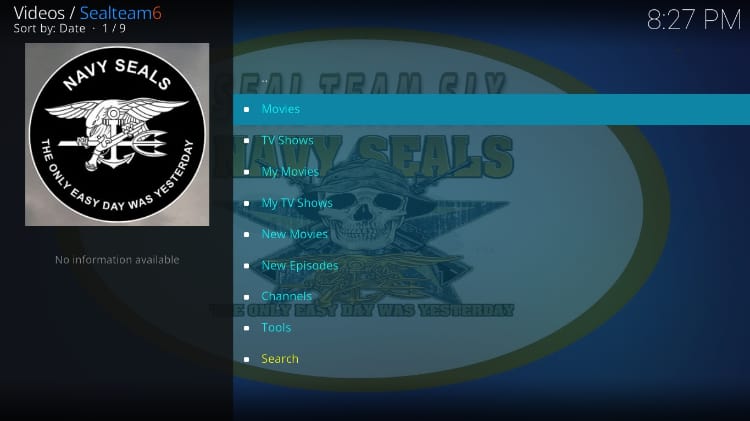
SealTeam6 Kodi Addon Menu

In this post, we provide step-by-step instructions on how to install the SealTeam6 Kodi addon.

Attention: Protect Your Privacy Online

Your ISP is always spying on you, and they can always tell the online sites and resources you access. This is quite a concern for Kodi users as the content provided is not usually hosted by the various addons and repositories. Rather, it is mostly hosted on insecure websites, and the content is often pirated.

This is a huge concern as such content is illegal in most countries and can easily lead to a clash with copyright authorities, and the government. Whenever using third-party Kodi addons such as SealTeam6, always ensure that you stream privately and anonymously with a VPN.

The Best VPN for Kodi

As streaming fans ourselves, we recommend that you use IPVanish, the best VPN for Kodi. The VPN provides super speeds and excellent privacy and security levels.

Here are a few highlights of IPVanish:

  • ⚡ Superb Speeds: Guarantees a smooth live streaming experience.
  • 🌍 Huge Server Network: You can connect to a nearby server for a fast and stable connection.
  • 🔑Unblock Anything: Safe access to censored apps, websites and torrent sites.
  • 😎 Best in Privacy: The VPN doesn’t keep any activity logs, and so your activities are only known to you.
  • 🔐 Top-notch Security: This VPN uses AES 256-bit encryption and provides multiple protocols alongside other security features such as a kill switch, DNS & IPv6 protection and WireGuard.
  • 💳 30 Days RISK FREE Money-Back Guarantee: In case you do not like the service, you can get every penny back if you cancel within 30 days!
You can get the VPN at 81% off using our exclusive offer below.

👍 Get 81% of IPVanish

How to Install SealTeam6 Kodi Addon

SealTeam6 is a third-party Kodi addon, so we’ll first need to enable installation from “unknown sources.”

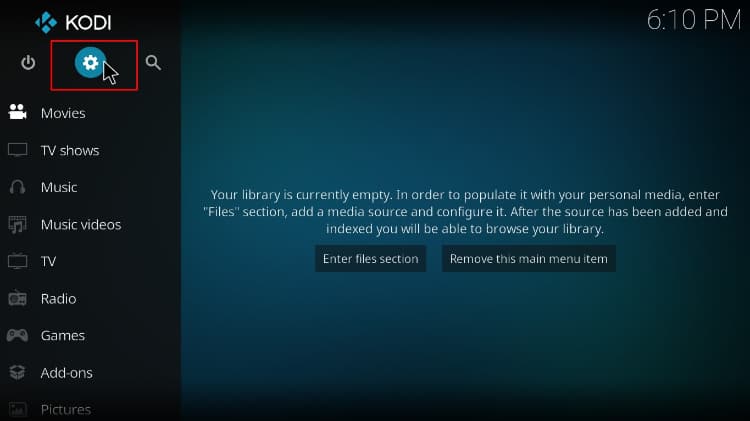
  1. Open Settings from the Kodi main page.
    Select Settings button on Kodi
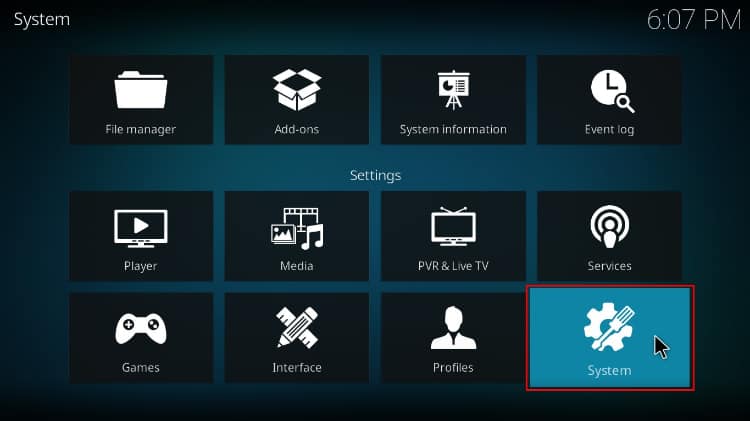
  2. Select System on the system page.
    Select to access Kodi system
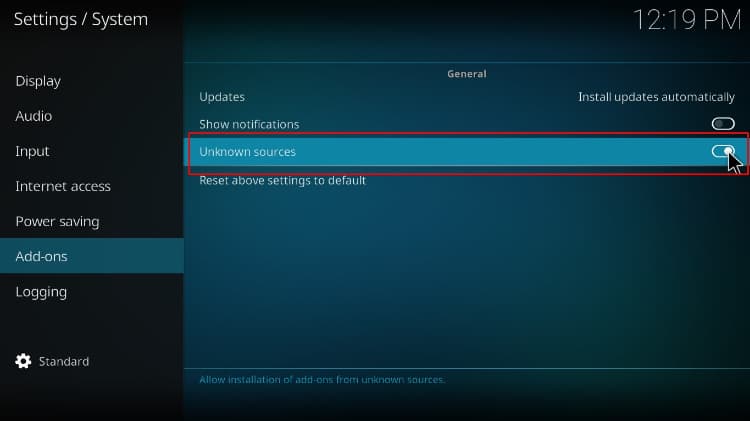
  3. Hover over Addons and enable Unknown Sources.
    Activate Unknown sources on Kodi

Kodi can now install addons from third-party sources. In future installations, you can skip this step.

Adding the Repository Source

✋ Before you add the URL, you need to turn on a reliable VPN like IPVanish first. Some ISPs frequently block various Kodi repositories to prevent the installation of addons that facilitate illegal streaming.

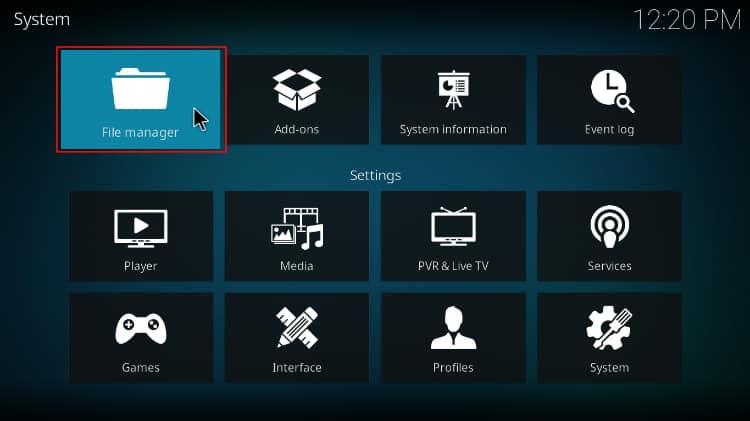
  1. From there go back to Settings and select File Manager.
    Select File manager to access sources on Kodi
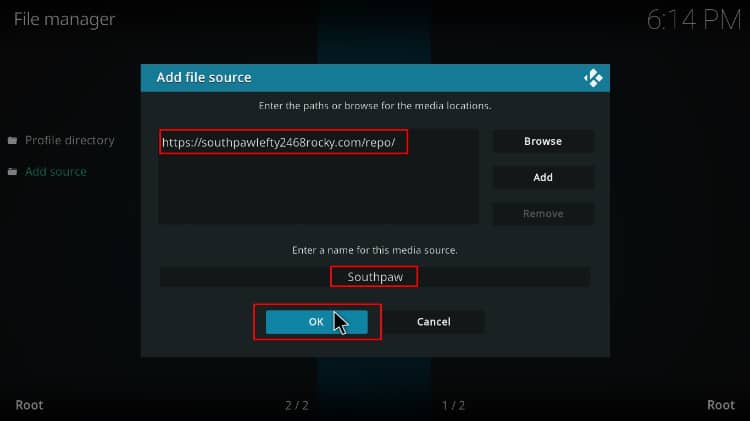
  2. Double-click “Add-Source” and type the URL https://southpawlefty2468rocky.com/repo/ into the window that opens. Type “Southpaw” under the textbox below, then click “OK.”
    Adding South Paw Repo source

Installing The South Paw Repo

Now, we can use the added source to install the source repository.

Sign up to our newsletter to receive guides and cord-cutting tips for free.
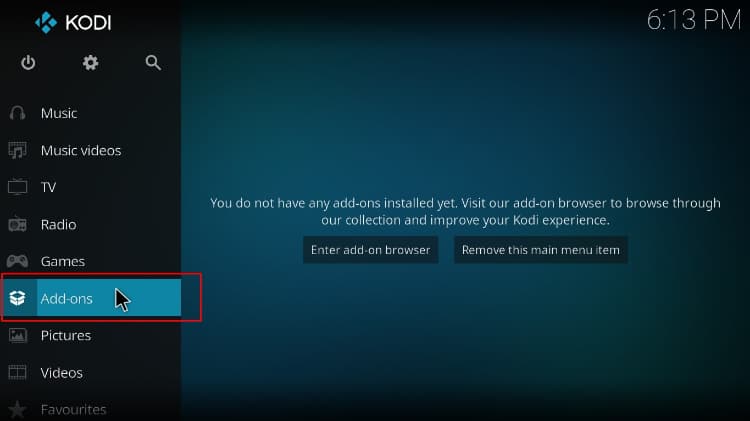
  1. While at the Kodi home screen click “Add-ons” on the left-hand side menu.
    Select Add-ons from the left menu on Kodi homepage
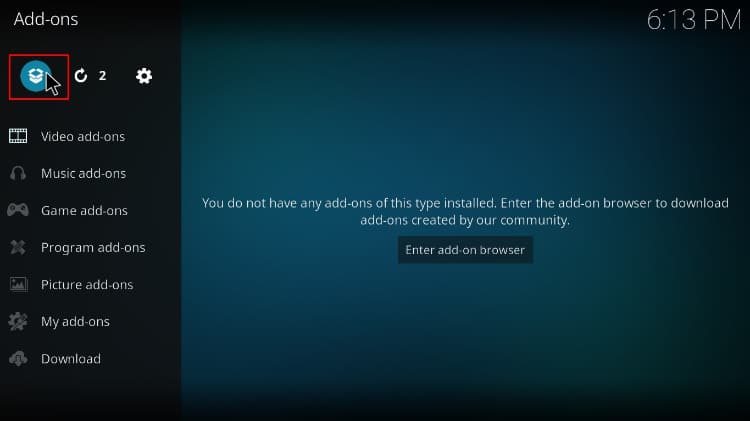
  2. On the top left side of the screen, click the open box icon.
    Select the package installer button on Kodi
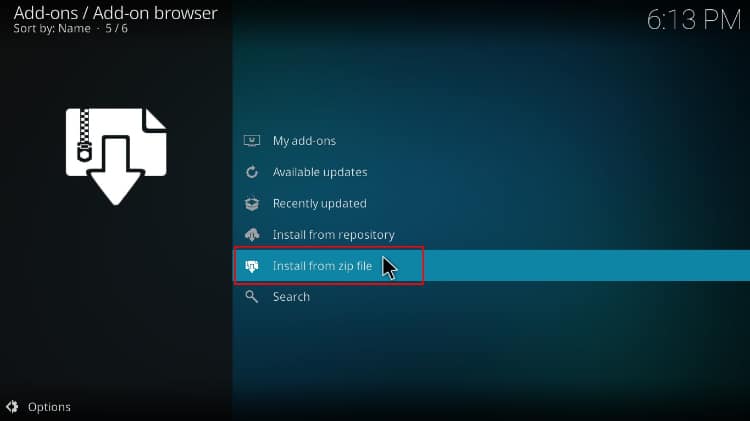
  3. Select “Install from Zip File.”
    Select install from zip file on Kodi
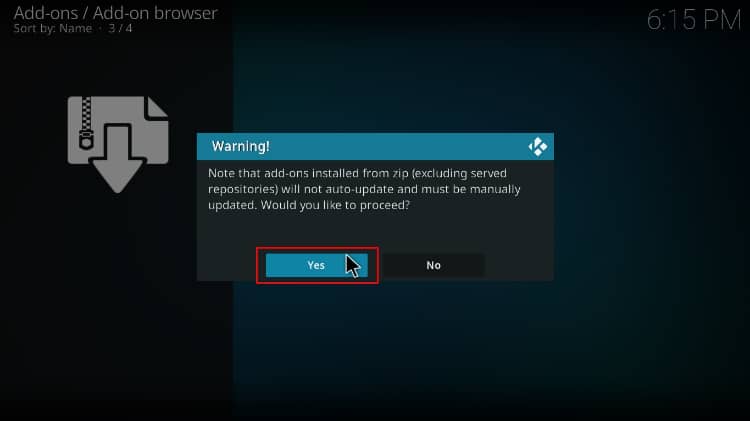
  4. Depending on your version, Kodi may throw a warning. Click Yes to proceed.
    Kodi 19 zip file warning
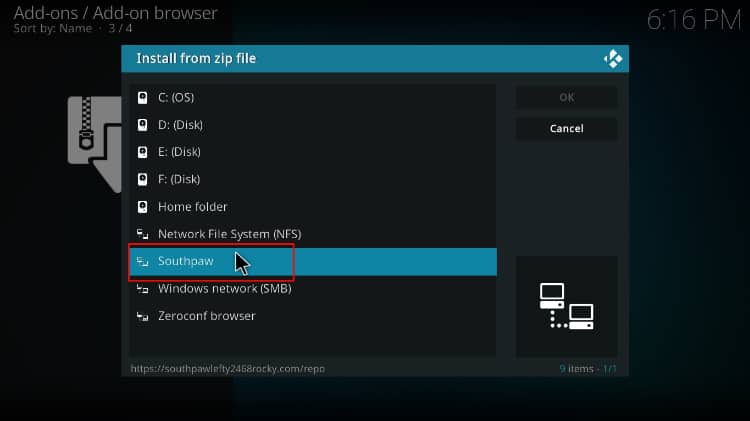
  5. Click Repos and then select “Southpaw.”
    Southpaw repo
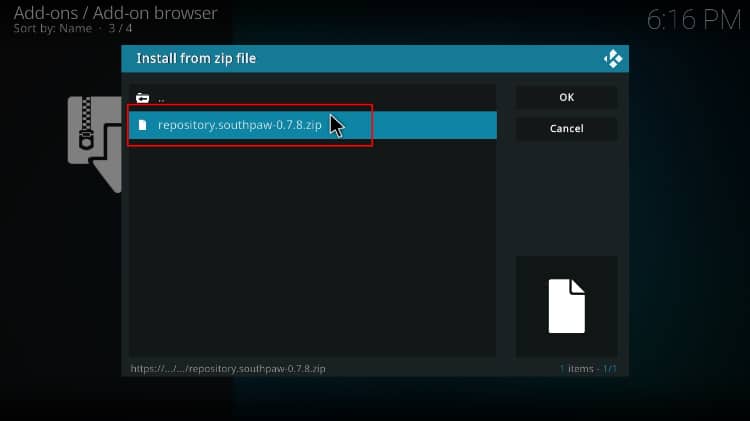
  6. Select repository.southpaw-x.x.x.zip.
    South Paw Repo zip file
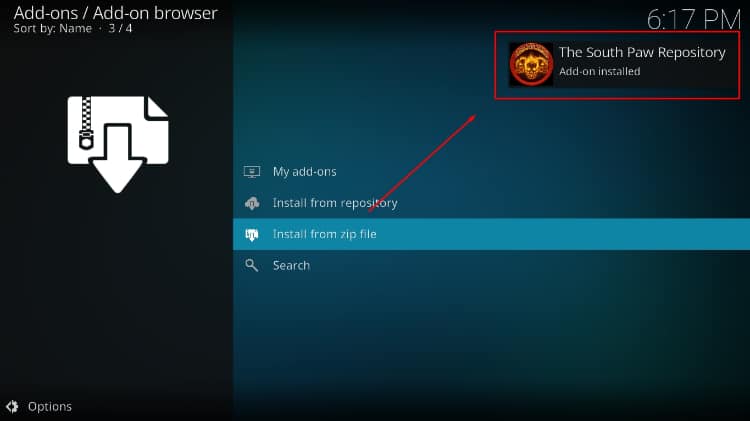
  7. You will receive a notification when the repo installs successfully.
    The South Paw Repo installed

Install SealTeam6 Kodi Addon

We can now install our addon.

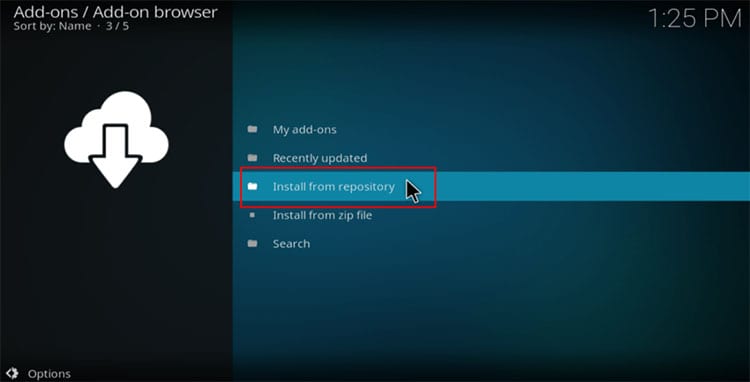
  1. While on the same page, click “Install from repository.”
    Select install from repository on Kodi
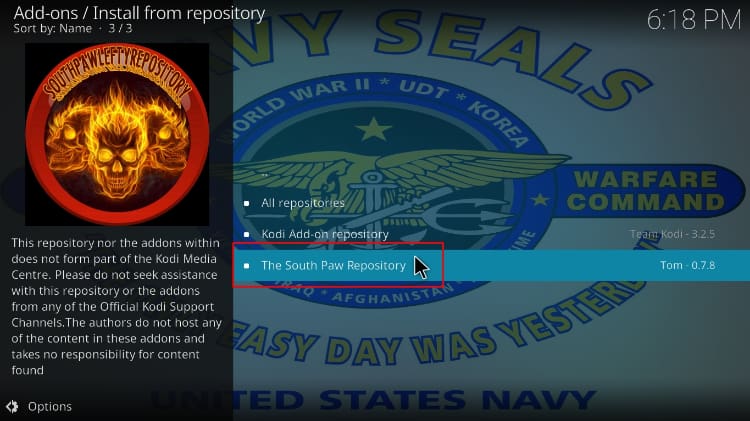
  2. Select “The South Paw Repository”
    The South Paw Repository
  3. Select “Video Add-ons” and then click on “SealTeam6.”
    Select SealTeam6 Kodi Addon
  4. You will now get an “Install” option. Hit it.
    install SealTeam6 Kodi addon
  5. You’ll get a pop-up of all the dependencies that will be installed along with the addon. Just click OK, and the Addon will now install.
    SealTeam6 dependencies
  6. After the process is complete, you’ll get a notification.
    SealTeam6 Addon installed

Now you’ve installed Sealteam6, explore your new addon and start streaming!

SealTeam6 Kodi Addon Menu

Check out more Kodi addon installation guides.

Wrap Up

SealTeam6 has been around for a while, and it’s one of the addons that focuses on simplicity. The addon provides free content, but you can also integrate Real-Debrid to enjoy higher-quality videos. However,

Warning:

Keep in mind that it is a third-party Kodi addon, so ensure you protect your online privacy using IPVanish.

Enjoy!
👋 Signup to our newsletter to receive guides and cord-cutting-tips tips for FREE!! Click Here!


Marketing permission: I give my consent to BestDroidPlayer to be in touch with me via email using the information I have provided in this form for the purpose of news, updates and marketing.

Legal disclaimer

BestDroidPlayer.com is in no way affiliated to any streaming application, apk or its addons. Also, we are not associated with the brands here shown as the references are only informative. Bestdroidplayer.com does not verify the legality or security of any apps, apks, addons or services mentioned on this site. We DO NOT HOST any copyright-protected software or streams and we DO NOT broadcast or provide any copyright-protected streams on this website - The content here provided is only informational and it should be used only to access content that is not protected by copyright. We strongly advise our readers to avoid piracy at all costs, if you decide to do so, it is your responsibility - We are not responsible for any of your activities.

If you wish to make a claim, please check our DMCA Notice Policy.

Affiliate disclosure: Bestdroidplayer.com is a reader-supported blog. If you buy a VPN or an Amazon product through our links, we may earn a commission that helps maintaining our blog. Our reviews are totally honest and we only recommend trusted VPN and ecommerce brands.

Filed Under: Kodi Addons Install Guides Tagged With: free streaming, kodi, Kodi Addon install guide, movies, SealTeam6, TV Shows

JT

Written by

Joel Timothy

Joel is a cybersecurity expert with 7+ years of experience and is dedicated to helping achieve a safer, more private digital space. He aims to empower individuals and organizations with the knowledge and tools needed to protect their online presence.

All guides by JoelLinkedIn

Related guides

  • Kodi Addons Install Guides

    Installation Guide for Placenta Kodi Addon | TV Shows & Movies Addon

    4 June 2018

  • Kodi Addons Install Guides

    How to Install Quicksilver Kodi Addon: Free Movies & TV Shows

    13 May 2024

  • Kodi Addons Install Guides

    How to Install ChainsGenocide Kodi Addon: Free HD Movies & TV Shows

    4 July 2023

  • Kodi Addons Install Guides

    How to Install 9 Lives Kodi Addon: Watch Free Movies & TV Shows

    25 January 2023

  • Kodi Addons Install Guides

    How to Install Gratis Kodi Addon: Free Movies & TV Shows

    18 August 2022

  • Kodi Addons Install Guides

    How to Install The Promise Kodi Addon: Free HD Movies & TV Shows

    12 July 2022

Reader Interactions

Leave a Reply

Your email address will not be published. Required fields are marked *

This site uses Akismet to reduce spam. Learn how your comment data is processed.

Primary Sidebar

Search

Follow us

  • Facebook
  • Pinterest
  • Twitter

Featured Posts

Kodi Setup Guide

Most Complete Kodi Setup Guide: All you need to know to use Kodi

Latest Articles

BestDroidplayer article image about VPN issues on Firestick with TV screen and remote.

VPN Not Working on Firestick? 8 Easy Ways to Fix It

4th November 2026 By bestdroidplayer

BestDroidplayer Free99 movie app interface screenshot.

How to Install Free99 Kodi Addon (2026 Guide)

3rd November 2026 By bestdroidplayer

AI video editing scene with 3D character on monitor for streaming.

How 3D Assets Can Improve AI Video and Streaming Content

3rd November 2026 By bestdroidplayer

Person holding smartphone with eSIM app in front of Rome skyline.

What to Compare Before Buying an eSIM Data Plan in Europe

23rd October 2026 By bestdroidplayer

bestdroidplayer

Tested guides for Kodi, Fire TV, Android TV and streaming apps, in English, Portuguese and French since 2014.

We host no files and are not affiliated with any app or addon we cover. Only stream content you have the rights to.

Menu

  • Homepage
  • About Us
  • All Posts
  • Bestdroidplayer FAQ
  • DMCA Notice Policy
  • Affiliate Disclosure
  • Disclaimer
  • Privacy Policy
  • Cookie Policy
  • Advertise with us – Banner Ads
  • Get in Touch
  • HTML Sitemap

About Us

Bestdroidplayer it’s a blog with News, Tips, and Tutorials about the streaming industry.
In this blog, you will find useful tips to cut the cord and save some bucks while you get the best streaming experience.

Read more about us here.

Legal Disclaimer

BestDroidPlayer.com is in no way affiliated to any streaming application, apk or its addons. Also,  we are not associated with the brands here shown as the references are only informative. Bestdroidplayer.com does not verify the legality or security of any apps, apks, addons or services mentioned on this site. We DO NOT HOST any copyright-protected software or streams and we DO NOT broadcast or provide any copyright-protected streams on this website – The content here provided is only informational. We strongly advise our readers to avoid piracy at all costs, if you decide to do so, it is your responsability – We are not responsible for any of your activities.

Copyright © 2026 Bestdroidplayer

EnglishPortuguêsFrançais

We value your privacy

We use cookies for statistics (Google Analytics) to see which guides help our readers. You can accept or refuse: the site works the same either way. Cookie policy