• Skip to main navigation
  • Skip to main content
  • Skip to primary sidebar
  • Skip to footer
bestdroidplayer
  • Free Guides
  • Free Tools
    • Streaming Bitrate Calculator
  • Kodi
    • Kodi Guide
    • Best Kodi Addons
    • Best Sports Kodi Addons
      • Best Football (Soccer) Kodi Addons
      • Best NFL Kodi Addons
      • Best Cricket Kodi Addons
      • Best UFC / MMA Kodi Addons
      • Best WWE Kodi Addons
    • Best Movie Kodi Addons
    • Best Live TV Addons
    • Addons List
      • Live Sports Addons
        • Install TvTap Addon
        • Install Sportowa TV Addon
        • Install Rising Tides Addon
        • Install SportHD Addon
        • Install Fight Club Addon
      • Movies & TV Shows
        • Install Exodus Redux Addon
        • Install Magic Dragon Addon
        • Install Covenant Addon
        • Install Tempest Addon
        • Install TAZ Addon
        • Install Seren Addon
        • Install The Promise Addon
        • Install EnterTain Me Addon
        • Install The Crew Addon
        • Install Nightwing Addon
        • Install Black Lightning Addon
        • Install Shadow Addon
        • Install Asgard Addon
      • Live TV Addons
        • Install TvTap/TapTv Addon
        • Install LiveNet TV Addon
        • Install The Crew Addon
        • Install USGoTv Addon
        • Install Asgard Addon
        • Install RBTv Addon
        • Install Centry Sports Addon
    • Fix Kodi Errors
    • More Kodi Articles
  • Stremio
    • Stremio Beginner Guide
    • How to Install Stremio on FireStick
    • How to Install Stremio on Android TV Box
    • How to Install Stremio Addons
    • Best Stremio Addons
  • Plex
    • Plex Channels (Overall)
    • Plex Channels for Movies
    • Plex Channels for Sports
    • Plex Channels for Kids
  • Fire TV Stick
    • How to Set Up Amazon Fire Stick
    • How to Jailbreak Amazon Firestick
    • Best Apps for Jailbroken Firestick
    • How to Get Local Channels on Firestick
    • Best IPTV Players for Firestick
    • Install Kodi on Fire TV Stick
    • Update Kodi on Fire TV Stick
    • Install a VPN on Fire TV Stick
    • Best Free VPN for Firestick & Fire TV
    • More Firestick Articles
  • VPN
    • Best VPN for Kodi
    • Free VPN for Android TV Box
    • Free VPN for Firestick & Fire TV
    • What you can do with a VPN
  • EN
  • PT
  • FR
  • EN
  • PT
  • FR
  1. Home
  2. Kodi News, Tips, Tutorials and Guides
  3. Kodi Addons Install Guides
  4. How to Install World TV Kodi Addon to watch Live TV in 2020

How to Install World TV Kodi Addon to watch Live TV in 2020

H

Last updated 2 August 2024 by Hutch

How to Install World TV Kodi Addon to watch Live TV

Bestdroidplayer.com is a reader-supported blog. If you buy a VPN or an Amazon product through our links, we may earn a commission that helps maintaining our blog. Our reviews are totally honest and we only recommend trusted VPN and ecommerce brands. Full affiliate disclosure

Contents hide
1. Features of World TV Kodi Addon
2. Advantages of Installing World TV Kodi Addon
3. Disadvantages of World TV Kodi Addon
4. Best VPN for Kodi in 2020
5. How to Install World TV Kodi Addon in 2020
6. Conclusion

Here I am with good news for all cord-cutters searching for an all-in-one Live TV Kodi addon. There are live TV addons which focus on a certain genre, for instance, sports or movie channels. But there is no need to install multiple Live TV addons for different categories if you have the World TV Kodi add-on. I will help you with the working method to install World TV Kodi Addon in 2020 but let us see why this add-on has become so popular these days.

Features of World TV Kodi Addon

Once you install World TV Kodi addon, you can watch Live TV channels nicely categorized. The Live TV categories on the World TV add-on interface are:

  • Documentary
  • Entertainment
  • Food
  • Kids
  • Movies
  • Music
  • News
  • Sports
  • USA Ch.

If you are a sports lover then I recommend you install the World TV Kodi addon right now. This add-on covers sports channels from all over the world including the UK – Sky Sports Premier League which is often quite difficult to find. If you love UFC Fights, run the UK – UFC Fight Pass or ESPN to watch your favorite fighters in action.

World TV add-on covers Star Sports, Sky Sports, Fox Sports (including Fox Sports US), ESPN, and other popular networks.

Advantages of Installing World TV Kodi Addon

  • Free streaming links to popular TV channels and networks
  • Covers a variety of channels including Movies, Entertainment, Sports, Kids, and Documentaries
  • Simple and clean interface

Disadvantages of World TV Kodi Addon

  • VPN is necessary for safe streaming since World TV is a community add-on
  • Some links are not stable and streaming speed and quality are sometimes disappointing. You can however optimize the speed by using a Good VPN.

Best VPN for Kodi in 2020

Streaming platforms are now largely dependent on community developers. Without add-ons and plugins, streaming platforms such as Kodi and Plex are merely media players. Where you find unlimited streaming options with these add-ons you need to be extra careful at the same time. These add-ons access servers in the public domain which means that your IP address and browsing data rests on these servers.

Live TV channels stream premium content such as ongoing sports events including the Tennis Grand Slams, Football Leagues, and UFC PPV Fights. It is better to avoid the stigma of copyright violation. Heavy fines and even possible imprisonment could play havoc with your life. Make sure to install a good VPN service to hide your identity from watchdogs and ISPs. The VPN lets you stream anonymously while encrypting the traffic and data. In simple words, VPN encryption protects your browsing history and personal information from ISPs and government agencies. In addition, hackers can’t break into your device through public WiFi if the VPN is active on your device.

The VPN I recommend

If you don’t have much idea about VPNs, I’ll recommend IPVanish. I’ve been using streaming platforms for years. Plex, Roku, Kodi, and Hulu are my favorites but I use them carefully with a VPN service. After testing a variety of VPNs, I can confidently conclude that IPVanish is the best VPN for safe streaming. Anonymity is what you are looking for and IPVanish ensures anonymous streaming thanks to its global network of servers in over 50 countries. The Zero-Log policy applies to each of the IPVanish servers. Your browsing history is saved nowhere. Nobody can retrieve the information about your online activities, not even your ISP.

IPVanish is the optimal VPN for Kodi. We were able to get an exclusive 81% of IPVanish.

Save 81% of IPVanish now!

How to Install World TV Kodi Addon in 2020

World TV is a third-party add-on. You must configure download settings on Kodi.

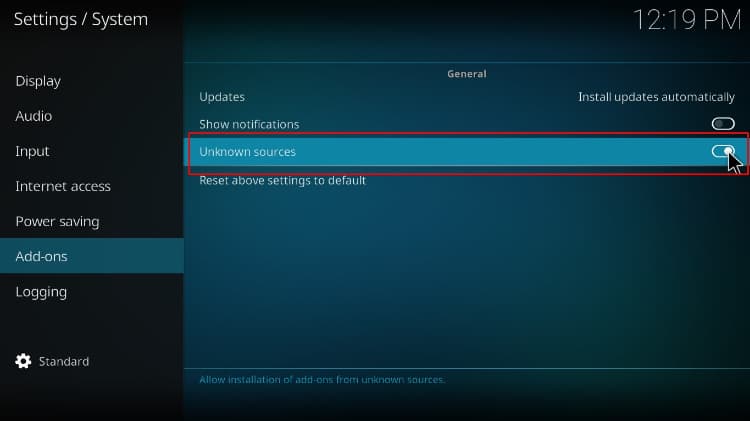
Enabling Unknown sources

  1. Run Kodi
  2. Hit Settings
  3. Select System
  4. Keep the pointer on add-ons (left panel of the interface) and then enable the option “Download from unknown sources” (from the right panel of the interface)
  5. Press OK
    Activate Unknown sources on Kodi

Install the Repository

World TV Addon is part of the known The Crew Repository which already gave us other excellent addons like Marauder, Asgard and, of course, The Crew itself so, it is time to install it on your Kodi.

Sign up to our newsletter to receive guides and cord-cutting tips for free.
  1. From the home screen, enter settings
  2. Select Files and scroll down to double-click Add source
  3. Double click <None> and type or copy https://team-crew.github.io/
  4. Type the name of the source, for instance, Crew, and then select OK
    Enter the The Crew Repo source url
  5. Return to the settings interface
  6. Press Add-ons (Package Installer) and select Install from zip file
  7. Find the source name (Crew) and select it
  8. Click on the zip file repository.thecrew-0.3.1.zipSelect the the crew repository, that contains the world TV Kodi addon
  9. The system installs The Crew Repo within a few seconds

Install the World TV Kodi Addon

  1. Staying on the same interface, select Install from repository and then select THE CREW REPO
    Can’t find the repository? Try to disable the Indigo Addon by going to Add-ons > My Add-ons > All; then locate and hit on Indigo to disable it and try again
  2. Scroll down to find and select World Tv
  3. Hit Install and click OKSelect the World TV addon from the list to install on your Kodi
  4. The system will install World TV Kodi addon in a few seconds. Just wait for the successful install message to pop-up

Once done, return to the home screen, go to add-ons > My add-ons > World TV to run the newly installed add-on.

Conclusion

It takes only a few minutes to install World TV Kodi addon and to enter a new world where the most important TV Channels are available online for free. But the excitement must not trick you into forgetting the importance of safe anonymous streaming.

Warning:

Most of the channels are blocked in different countries. A good VPN service with a wide network of servers can easily unblock most of the Live TV channels on World TV addon.So, Install a good VPN like IPVanish and run it before running World TV addon

If you were looking for a good addon to install and watch Live TV on Kodi, I hope this article on How to install World TV Kodi addon, has answered you positively. Please let us your experience in the comments box below, rate, and share it with your friends.

Have a nice Live TV Journey!

👋 Signup to our newsletter to receive guides and cord-cutting-tips tips for FREE!! Click Here!


Marketing permission: I give my consent to BestDroidPlayer to be in touch with me via email using the information I have provided in this form for the purpose of news, updates and marketing.

Legal disclaimer

BestDroidPlayer.com is in no way affiliated to any streaming application, apk or its addons. Also, we are not associated with the brands here shown as the references are only informative. Bestdroidplayer.com does not verify the legality or security of any apps, apks, addons or services mentioned on this site. We DO NOT HOST any copyright-protected software or streams and we DO NOT broadcast or provide any copyright-protected streams on this website - The content here provided is only informational and it should be used only to access content that is not protected by copyright. We strongly advise our readers to avoid piracy at all costs, if you decide to do so, it is your responsibility - We are not responsible for any of your activities.

If you wish to make a claim, please check our DMCA Notice Policy.

Affiliate disclosure: Bestdroidplayer.com is a reader-supported blog. If you buy a VPN or an Amazon product through our links, we may earn a commission that helps maintaining our blog. Our reviews are totally honest and we only recommend trusted VPN and ecommerce brands.

Filed Under: Kodi Addons Install Guides Tagged With: Kodi addon, Live TV, tv channels, world tv

Related guides

  • Sports Streaming

    How to Watch NCAA March Madness 2020 Live Online on Kodi & Android

    3 March 2020

  • Sports Streaming

    Watch Super Bowl 2020 Chiefs vs 49ers Live on Firestick and Kodi

    31 January 2020

  • Sports Streaming

    How to Watch Australian Open 2020 Live on Firestick and Kodi

    30 January 2020

  • Sports Streaming

    How to watch WWE ROYAL RUMBLE 2020 Live on Kodi

    26 January 2020

  • Sports Streaming

    How to watch Euro 2020/2021 for Free on Firestick: Every match live from anywhere

    15 June 2021

  • Kodi Addons Install Guides

    How to Install Base Kodi Addon in 2020 to watch Movies and TV Shows

    28 July 2020

Reader Interactions

Leave a Reply

Your email address will not be published. Required fields are marked *

This site uses Akismet to reduce spam. Learn how your comment data is processed.

Primary Sidebar

Search

Follow us

  • Facebook
  • Pinterest
  • Twitter

Featured Posts

Kodi Setup Guide

Most Complete Kodi Setup Guide: All you need to know to use Kodi

Latest Articles

BestDroidplayer article image about VPN issues on Firestick with TV screen and remote.

VPN Not Working on Firestick? 8 Easy Ways to Fix It

4th November 2026 By bestdroidplayer

BestDroidplayer Free99 movie app interface screenshot.

How to Install Free99 Kodi Addon (2026 Guide)

3rd November 2026 By bestdroidplayer

AI video editing scene with 3D character on monitor for streaming.

How 3D Assets Can Improve AI Video and Streaming Content

3rd November 2026 By bestdroidplayer

Person holding smartphone with eSIM app in front of Rome skyline.

What to Compare Before Buying an eSIM Data Plan in Europe

23rd October 2026 By bestdroidplayer

bestdroidplayer

Tested guides for Kodi, Fire TV, Android TV and streaming apps, in English, Portuguese and French since 2014.

We host no files and are not affiliated with any app or addon we cover. Only stream content you have the rights to.

Menu

  • Homepage
  • About Us
  • All Posts
  • Bestdroidplayer FAQ
  • DMCA Notice Policy
  • Affiliate Disclosure
  • Disclaimer
  • Privacy Policy
  • Cookie Policy
  • Advertise with us – Banner Ads
  • Get in Touch
  • HTML Sitemap

About Us

Bestdroidplayer it’s a blog with News, Tips, and Tutorials about the streaming industry.
In this blog, you will find useful tips to cut the cord and save some bucks while you get the best streaming experience.

Read more about us here.

Legal Disclaimer

BestDroidPlayer.com is in no way affiliated to any streaming application, apk or its addons. Also,  we are not associated with the brands here shown as the references are only informative. Bestdroidplayer.com does not verify the legality or security of any apps, apks, addons or services mentioned on this site. We DO NOT HOST any copyright-protected software or streams and we DO NOT broadcast or provide any copyright-protected streams on this website – The content here provided is only informational. We strongly advise our readers to avoid piracy at all costs, if you decide to do so, it is your responsability – We are not responsible for any of your activities.

Copyright © 2026 Bestdroidplayer

EnglishPortuguêsFrançais

We value your privacy

We use cookies for statistics (Google Analytics) to see which guides help our readers. You can accept or refuse: the site works the same either way. Cookie policy