• Skip to main navigation
  • Skip to main content
  • Skip to primary sidebar
  • Skip to footer
bestdroidplayer
  • Free Guides
  • Free Tools
    • Streaming Bitrate Calculator
  • Kodi
    • Kodi Guide
    • Best Kodi Addons
    • Best Sports Kodi Addons
      • Best Football (Soccer) Kodi Addons
      • Best NFL Kodi Addons
      • Best Cricket Kodi Addons
      • Best UFC / MMA Kodi Addons
      • Best WWE Kodi Addons
    • Best Movie Kodi Addons
    • Best Live TV Addons
    • Addons List
      • Live Sports Addons
        • Install TvTap Addon
        • Install Sportowa TV Addon
        • Install Rising Tides Addon
        • Install SportHD Addon
        • Install Fight Club Addon
      • Movies & TV Shows
        • Install Exodus Redux Addon
        • Install Magic Dragon Addon
        • Install Covenant Addon
        • Install Tempest Addon
        • Install TAZ Addon
        • Install Seren Addon
        • Install The Promise Addon
        • Install EnterTain Me Addon
        • Install The Crew Addon
        • Install Nightwing Addon
        • Install Black Lightning Addon
        • Install Shadow Addon
        • Install Asgard Addon
      • Live TV Addons
        • Install TvTap/TapTv Addon
        • Install LiveNet TV Addon
        • Install The Crew Addon
        • Install USGoTv Addon
        • Install Asgard Addon
        • Install RBTv Addon
        • Install Centry Sports Addon
    • Fix Kodi Errors
    • More Kodi Articles
  • Stremio
    • Stremio Beginner Guide
    • How to Install Stremio on FireStick
    • How to Install Stremio on Android TV Box
    • How to Install Stremio Addons
    • Best Stremio Addons
  • Plex
    • Plex Channels (Overall)
    • Plex Channels for Movies
    • Plex Channels for Sports
    • Plex Channels for Kids
  • Fire TV Stick
    • How to Set Up Amazon Fire Stick
    • How to Jailbreak Amazon Firestick
    • Best Apps for Jailbroken Firestick
    • How to Get Local Channels on Firestick
    • Best IPTV Players for Firestick
    • Install Kodi on Fire TV Stick
    • Update Kodi on Fire TV Stick
    • Install a VPN on Fire TV Stick
    • Best Free VPN for Firestick & Fire TV
    • More Firestick Articles
  • VPN
    • Best VPN for Kodi
    • Free VPN for Android TV Box
    • Free VPN for Firestick & Fire TV
    • What you can do with a VPN
  • EN
  • PT
  • FR
  • EN
  • PT
  • FR
  1. Home
  2. Kodi News, Tips, Tutorials and Guides
  3. What is Trakt and how to use it with Kodi for streaming organization

What is Trakt and how to use it with Kodi for streaming organization

H

Last updated 7 June 2019 by Hutch

Do you remember the TV Show you swore never loose any season, but you are tired to check out wether was already launched? Well you have more serious things to be concerned to, haven’t you? Fortunately, there’s a service that will take care of your favorite streams colecting them and warning you – Trakt is the name. This article is all on What is Trakt and how to use it with Kodi for streaming organization.
What is Trakt and how to use it with Kodi for streaming organization

Bestdroidplayer.com is a reader-supported blog. If you buy a VPN or an Amazon product through our links, we may earn a commission that helps maintaining our blog. Our reviews are totally honest and we only recommend trusted VPN and ecommerce brands. Full affiliate disclosure

Contents hide
1. The History of Trakt
2. Do You Need a VPN With Trakt?
3. Using Trakt with Kodi

Trakt is one of those things that you did not know you needed until you have it; then you wonder how you lived without it. It’s actually quite surprisingly useful. Simply stating that it is designed to keep track of TV shows and movies that you watch does not do it justice.

You see, Trakt does keep a log of your viewing experiences online, but that’s really the tip of the iceberg. Aside from an ongoing log, Trakt is also great at suggesting related shows and even informing you when the next episode in the show you’re watching is coming up. If you’ve cut the cord or if you do not have access to a PVR this is really a huge benefit. This way you know when the stream will show up on Morph for example so that you can get the popcorn ready!

Trakt can be able to be integrated into a media center or a home theater.  It is even capable of being integrated into a smartphone and the website is also available directly on tablets and desktops. With Trakt enabled your shows across many different streaming applications can be synchronized.

The History of Trakt

Trakt started a plugin used to track content, and it was built by Sean Rudford and Justin Nemeth.  It was initially launched as a beta in 2010, which focused on Kodi, formerly XboxMedia Center.  It became popular to a small community of XBMC users.  Then with the feedback, they have received from the active community, they continued to make adjustments to the design, to reach a larger audience.

It was in 2011, that Trakt was featured in Lifehacker. This exposure boosted its user base overnight as it grew from 3,000 users to over 200,000 users by 2012.

Do You Need a VPN With Trakt?

A VPN or Virtual Private Networks are created to allow users to create a secure connection to another network over the net.  A GOOD VPN like IPVanish, is capable of the following:

  • Accessing region restricted websites. There are regions that are so strict in security, that they don’t allow their people to access some websites; they think you are not useful to them.  However, with the use of a VPN, you will be empowered those restricted websites and will be able to access them.
  • Shield your browsing activities in an unsecured public WI-FI. It is well known in the internet community, that every time you browse in public Wi-Fi, someone is prying on your important data’s. VPNs will shield your browsing activities from them.
  • Privacy and Security. Governments around the world are constantly changing what is and isn’t legal. It is actually quite difficult to stay current and in some cases, it is possible to inadvertently do something that could get you into trouble with the law. A VPN secures your connection so that if you do access a stream with copyrighted content, you will not get into any trouble.

So, answering: you don’t need a VPN with Trakt; you need a VPN since you connect on internet, especially when streaming.

Our recommendation

When it comes to choosing the right VPN, for me the choice is extremely clear. I have used many VPNs over the years and I believe that IPVanish is by far the best choice. It works across almost every device and is also fully supported on Kodi. The best thing that you need to know though is that we managed to get an exclusive 81% of IPVanish.

Save 81% of IPVanish now!

Using Trakt with Kodi

Kodi has become a very popular open source media center to many video enthusiasts everywhere in the world.  It became available in 2002  as Xbox Media Player and was in fact initially known as XBMC before it changed its name to Kodi.

It is supported on almost every operating system in the market; from Windows to Mac and Linux and also Android where it has really taken off. Android boxes with their ability to directly connect to Televisions through HDMI paired up with Kodi have transformed our television viewing landscape over recent years.

Setting up an account

You should first set up a free Trakt account. Once you’ve done that, go through the configuration steps to personalize it based on your favorites shows and genres. It will also “learn” based on your viewing activities over time but this speeds up the process.
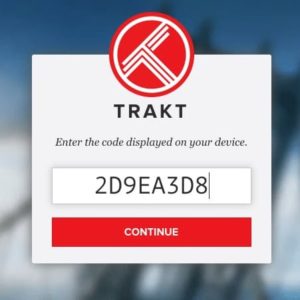
Account creation on TraktYou can then add shows and movies that you’ve already watched. Don’t worry if you do not get the exact date right; it’s fun to see trends over time, but it’s not really necessary. You can if you want to add some social media platforms so that you can share your viewing activities online, but again this isn’t a requirement. Once you’ve configured your account the next step is to link it with some Kodi addons.

Many Kodi addons support Trakt so depending on which one you are using for most of your viewing activities, the best thing to check is the tools section. You’ll often find a link to Trakt in the accounts subsection or even directly within the addon itself.

Sign up to our newsletter to receive guides and cord-cutting tips for free.

Setting up Kodi Addons to use Trakt

You will need to “activate” the addon for use with Trakt. However due to most Third-party Addons behavior which access streams illegally…

 Turn your VPN On, before streaming anything on Kodi

To do this simply:

  1. Click with the right button of your mouse on the intended Kodi Addon .
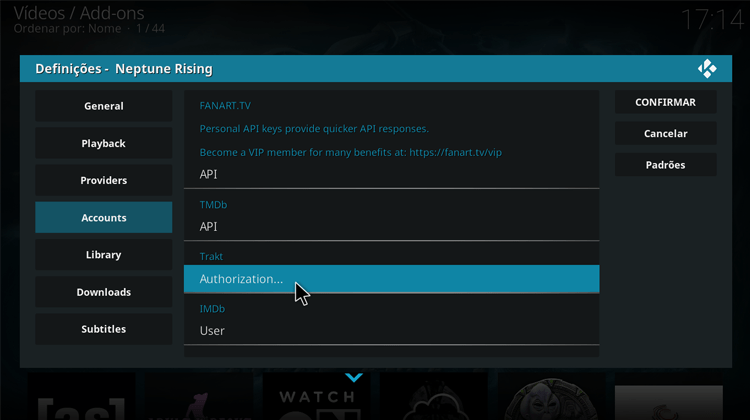
  2. On the popup that will appear, click on “Accounts“, find the Trakt section and Click on”Authorization“. If there’s no “Accounts” on the left menu, repeat the first step this time by opening the Addon, and navigating to Tools (if available)Open a Kodi Addon and select accounts
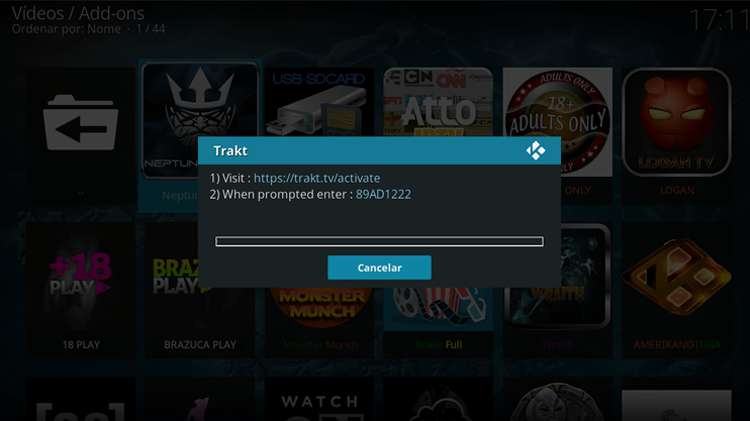
  3. Another popup will show up, stating that you should visit – https://trakt.tv/activate – and you will have to enter a specific code that will be shown on your screen. Just do it,and you’re done!Insert the Kodi addon trakt details on your trakt

Follow these simple steps and your addon will be linked with Trakt. It really is that simple! Once this is done, everything that you view with this addon will be automatically logged on the Trakt site.

Hope this article on What is Trakt and how to use it with Kodi. If so, please rate, and share it with your friends.

Have good streaming suggestions!

[kkstarratings]
👋 Signup to our newsletter to receive guides and cord-cutting-tips tips for FREE!! Click Here!


Marketing permission: I give my consent to BestDroidPlayer to be in touch with me via email using the information I have provided in this form for the purpose of news, updates and marketing.

Legal disclaimer

BestDroidPlayer.com is in no way affiliated to any streaming application, apk or its addons. Also, we are not associated with the brands here shown as the references are only informative. Bestdroidplayer.com does not verify the legality or security of any apps, apks, addons or services mentioned on this site. We DO NOT HOST any copyright-protected software or streams and we DO NOT broadcast or provide any copyright-protected streams on this website - The content here provided is only informational and it should be used only to access content that is not protected by copyright. We strongly advise our readers to avoid piracy at all costs, if you decide to do so, it is your responsibility - We are not responsible for any of your activities.

If you wish to make a claim, please check our DMCA Notice Policy.

Affiliate disclosure: Bestdroidplayer.com is a reader-supported blog. If you buy a VPN or an Amazon product through our links, we may earn a commission that helps maintaining our blog. Our reviews are totally honest and we only recommend trusted VPN and ecommerce brands.

Filed Under: Kodi News, Tips, Tutorials and Guides Tagged With: Kodi Add-ons, movies, Streaming, trakt, TV Shows

Related guides

  • Kodi News, Tips, Tutorials and Guides

    5 Reasons why you should use a VPN while streaming on Kodi

    1 August 2017

  • Cyber Security

    5 Reasons to use a VPN on Firestick & Fire TV while streaming

    16 March 2019

  • Kodi Addons Install Guides

    How to Install and use Netflix on Kodi

    6 April 2022

  • Kodi Addons Install Guides

    How to Install and Use Misfit Mods Lite Kodi Build on FireStick

    6 February 2022

  • Kodi News, Tips, Tutorials and Guides

    AllDebrid: How to install and use on Kodi

    12 February 2021

  • Firestick / Fire TV Tips, Guides and Tutorials

    How to Use Firestick Remote App – Free Apps and Alternatives

    17 March 2022

Reader Interactions

Leave a Reply

Your email address will not be published. Required fields are marked *

This site uses Akismet to reduce spam. Learn how your comment data is processed.

Primary Sidebar

Search

Follow us

  • Facebook
  • Pinterest
  • Twitter

Featured Posts

Kodi Setup Guide

Most Complete Kodi Setup Guide: All you need to know to use Kodi

Latest Articles

BestDroidplayer article image about VPN issues on Firestick with TV screen and remote.

VPN Not Working on Firestick? 8 Easy Ways to Fix It

4th November 2026 By bestdroidplayer

BestDroidplayer Free99 movie app interface screenshot.

How to Install Free99 Kodi Addon (2026 Guide)

3rd November 2026 By bestdroidplayer

AI video editing scene with 3D character on monitor for streaming.

How 3D Assets Can Improve AI Video and Streaming Content

3rd November 2026 By bestdroidplayer

Person holding smartphone with eSIM app in front of Rome skyline.

What to Compare Before Buying an eSIM Data Plan in Europe

23rd October 2026 By bestdroidplayer

bestdroidplayer

Tested guides for Kodi, Fire TV, Android TV and streaming apps, in English, Portuguese and French since 2014.

We host no files and are not affiliated with any app or addon we cover. Only stream content you have the rights to.

Menu

  • Homepage
  • About Us
  • All Posts
  • Bestdroidplayer FAQ
  • DMCA Notice Policy
  • Affiliate Disclosure
  • Disclaimer
  • Privacy Policy
  • Cookie Policy
  • Advertise with us – Banner Ads
  • Get in Touch
  • HTML Sitemap

About Us

Bestdroidplayer it’s a blog with News, Tips, and Tutorials about the streaming industry.
In this blog, you will find useful tips to cut the cord and save some bucks while you get the best streaming experience.

Read more about us here.

Legal Disclaimer

BestDroidPlayer.com is in no way affiliated to any streaming application, apk or its addons. Also,  we are not associated with the brands here shown as the references are only informative. Bestdroidplayer.com does not verify the legality or security of any apps, apks, addons or services mentioned on this site. We DO NOT HOST any copyright-protected software or streams and we DO NOT broadcast or provide any copyright-protected streams on this website – The content here provided is only informational. We strongly advise our readers to avoid piracy at all costs, if you decide to do so, it is your responsability – We are not responsible for any of your activities.

Copyright © 2026 Bestdroidplayer

EnglishPortuguêsFrançais

We value your privacy

We use cookies for statistics (Google Analytics) to see which guides help our readers. You can accept or refuse: the site works the same either way. Cookie policy