• Skip to main navigation
  • Skip to main content
  • Skip to primary sidebar
  • Skip to footer
bestdroidplayer
  • Free Guides
  • Free Tools
    • Streaming Bitrate Calculator
  • Kodi
    • Kodi Guide
    • Best Kodi Addons
    • Best Sports Kodi Addons
      • Best Football (Soccer) Kodi Addons
      • Best NFL Kodi Addons
      • Best Cricket Kodi Addons
      • Best UFC / MMA Kodi Addons
      • Best WWE Kodi Addons
    • Best Movie Kodi Addons
    • Best Live TV Addons
    • Addons List
      • Live Sports Addons
        • Install TvTap Addon
        • Install Sportowa TV Addon
        • Install Rising Tides Addon
        • Install SportHD Addon
        • Install Fight Club Addon
      • Movies & TV Shows
        • Install Exodus Redux Addon
        • Install Magic Dragon Addon
        • Install Covenant Addon
        • Install Tempest Addon
        • Install TAZ Addon
        • Install Seren Addon
        • Install The Promise Addon
        • Install EnterTain Me Addon
        • Install The Crew Addon
        • Install Nightwing Addon
        • Install Black Lightning Addon
        • Install Shadow Addon
        • Install Asgard Addon
      • Live TV Addons
        • Install TvTap/TapTv Addon
        • Install LiveNet TV Addon
        • Install The Crew Addon
        • Install USGoTv Addon
        • Install Asgard Addon
        • Install RBTv Addon
        • Install Centry Sports Addon
    • Fix Kodi Errors
    • More Kodi Articles
  • Stremio
    • Stremio Beginner Guide
    • How to Install Stremio on FireStick
    • How to Install Stremio on Android TV Box
    • How to Install Stremio Addons
    • Best Stremio Addons
  • Plex
    • Plex Channels (Overall)
    • Plex Channels for Movies
    • Plex Channels for Sports
    • Plex Channels for Kids
  • Fire TV Stick
    • How to Set Up Amazon Fire Stick
    • How to Jailbreak Amazon Firestick
    • Best Apps for Jailbroken Firestick
    • How to Get Local Channels on Firestick
    • Best IPTV Players for Firestick
    • Install Kodi on Fire TV Stick
    • Update Kodi on Fire TV Stick
    • Install a VPN on Fire TV Stick
    • Best Free VPN for Firestick & Fire TV
    • More Firestick Articles
  • VPN
    • Best VPN for Kodi
    • Free VPN for Android TV Box
    • Free VPN for Firestick & Fire TV
    • What you can do with a VPN
  • EN
  • PT
  • FR
  • EN
  • PT
  • FR
  1. Home
  2. Sports Streaming
  3. How to Watch British Grand Prix using the right streaming applications

How to Watch British Grand Prix using the right streaming applications

H

Last updated 6 July 2019 by Hutch

Fans of motorsports don’t loose any Grand Prix, much less one of the most important as the British Grand Prix. But if you are overseas, you are going to have some problems watching it either on TV or online. Thinking of you, we wrote this article to guide you on How to Watch British Grand Prix using the right streaming applications

How to Watch British Grand Prix using the right streaming applications

Bestdroidplayer.com is a reader-supported blog. If you buy a VPN or an Amazon product through our links, we may earn a commission that helps maintaining our blog. Our reviews are totally honest and we only recommend trusted VPN and ecommerce brands. Full affiliate disclosure

Contents hide
1. About the race and the circuit…
2. Why a VPN is important when Watching the Grand Prix
3. How to Watch British Grand Prix on Kodi?
4. How to Watch British Grand Prix on Sportz TV?
5. Conclusion

The 2019 season of Formula 1 began with the Australia Grand Prix on March 5th. If you’re a motorsport lover, of course, you love Formula 1 races. The British Grand Prix is the oldest race in the calendar. If you don’t want to miss it, we’re going to explain to you here how to watch it. All this in a simple way and for free

About the race and the circuit…

As the first race back in 1950, this year it will be at Silverstone circuit. Many people consider it one of the greatest race tracks in the world. It was the Silverstone’s airfield in 1942 and was used for a proper motor race for the first time in 1947.

The circuit length is around 5.8 kilometers. The drivers must do 52 laps around the circuit. The competitors must drive almost 307 kilometers in the entire race. The record of the fastest lap belongs to Lewis Hamilton. He completed a lap in 1:30.621 minutes.

Royal Air Force Aerobatic TeamThis year the race itself will be on July 14th. The event will start on July 12th with the first and the second practices. The 3rd practice will be on July 13th like the qualifiers.  Each year there is a British Grand Prix festivity on Saturday night before the race. This year special guest will be Craig David. As a tradition since 1965, the Royal Air Force Aerobatic Team will perform before the race.

This years season is on fire. And of course, everyone has its favorite. This year Lewis Hamilton is one of the greatest favorites. The driver of Mercedes has won 6 races this year and will be looking for his 6th victory in this circuit. 

Another favorite for this race is Sebastian Vettel, of Ferrari team. He has been in the first 5 places in all the careers this season. He has even reached second place 3 times. He was far away from the championship the past seasons, but this promises to be his year. 

Whatever it happens this promise to be a great race. If you want to enjoy it, the first thing you need to do is downloading a Good VPN. Keep reading and find out why.

Why a VPN is important when Watching the Grand Prix

As we said before you will need a VPN to watch British Grand Prix on Kodi. This is because we’ll recommend using Kodi. It works with addons which lets you watch the content for free, without having to worry about cable or satellite bills or subscriptions!
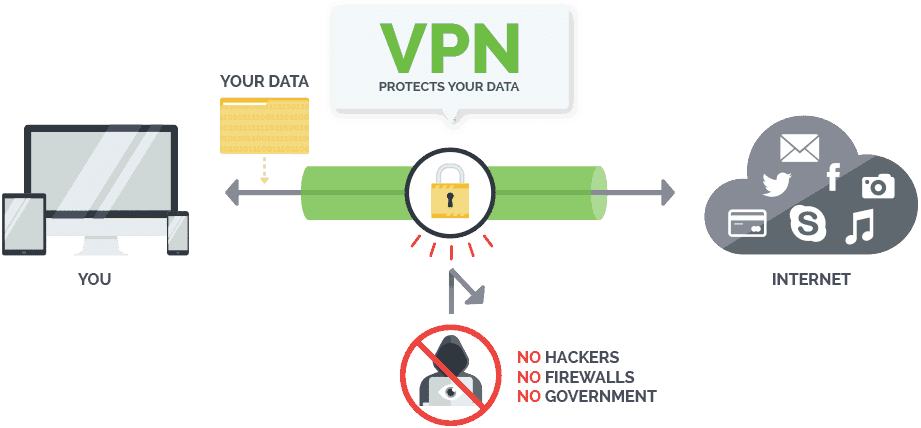
This is how a VPN works

It will encrypt all your information and replace your IP address while connecting. Which means it will create a barrier around your information. This will keep everyone outside your information. This includes hackers and even the government. Let’s be honest, nowadays everyone is prone to suffer a hacker attack. This is one of the cheapest and most efficient ways to be safe.

Like we told you at the beginning of this section, a VPN will help you to bypass all geographic restrictions. This can sound like a complicated work, but actually, it’s pretty simple. Good commercial VPNs like IPVanish have many servers around the world. All you need to do is to connect to one server in a country without geo-restrictions. 

Also, when streaming content online, ISPs often slow down access dramatically which causes streams to buffer and crash. With a VPN in place though, they do not know what you are doing online so cannot block your activities.

The VPN we recommend

IPVanish is the one we recommend. It will keep your information completely safe from hackers’ attacks. Also, it will hide your identity while you use it. Finally, it will bypass all geo-restrictions with its thousands of servers around the world. Another major point in IPVanish‘s favor is the fact that it has a “no logging” policy. This means it doesn’t track your activities at all so you know that you are completely safe and secure when using it.

For helping you to start, we managed to get an exclusive 81% of IPVanish.

Save 81% of IPVanish now!

How to Watch British Grand Prix on Kodi?

At this point, we’ve talked a lot about Kodi and its addons. In case you don’t know, Kodi is a streaming app. You can see multimedia content like movies, TV shows, and series. Also, you can watch live-streaming events through it. It won’t give you the video itself, you can’t download the video. It will provide you a link to see the content.

You can get that link through its many add-ons. You can download them for free. There are many addons available on the market. If you want to see a specific content you need to know which one you should use. This is why we made a list of the best Kodi add-ons to watch Formula 1 races live. The British Grand Prix won’t be the exception.

NBC Sports Live Extra

NBC Sports Live Extra is a Kodi official addon good to Watch the British Grand PrixThis is by far the most popular add-on for live streaming sports events. It has been available for a while in the official Kodi add-on repo. In this way you’ll get high–quality streaming and the most important legal content. This add-on has a geographical restriction. You need to be in the US to use it. With IPVanish this won’t be a problem.

Sign up to our newsletter to receive guides and cord-cutting tips for free.

Sports365.Live

Sport365 live is a kodi addon for live sports streaming and so to Watch British Grand PrixThis is another popular sports add-on. It has all the sports classified in many categories. The only difference between other sports’ add-ons is that you only can watch live sports here. It’s still a great option to see all Formula 1 races.

Check out our detailed post on installing Sports365 for instructions on how to get this amazing addon onto your device.

ESPN3

ESPN is an official Kodi Addon suitable to Watch British Grand PrixAnother great add-on for sports if of course ESPN. It’s available on the official add-on repository of Kodi. You can see any sport you want using it, even live-streaming. Like NBC Sports, it’s available in the US only. But with a Good VPN like IPVanish you can enjoy its content worldwide.


How to Watch British Grand Prix on Sportz TV?

How to Install Sportz TV on Firestick or Fire TV and Android devicesAnother newer addon that is worth looking at especially if you have a Firestick or Android box is Sportz TV.  With Sportz TV you get access to additional content (movies, tv shows, news, etc.) in addition to sports making it a good one-stop source for all of your entertainment needs. However Sportz TV states that its users are the sole responsible for copyright violations if occurs when using the streaming service; so you better protect yourself with a Good VPN.

Check out install instructions for Sportz TV here.

Conclusion

As you can see, using a streaming application like Kodi or Sportz TV are simplest ways to enjoy British Grand Prix 2019. You only need a good internet connection and IPVanish, our recommended VPN. It will make you avoid the geographical restrictions of the addons like NBC and ESPN. You will be able to enjoy those channels outside the US.

Hope this article on How to Watch British Grand Prix using the right Streaming applications. If you know another addon where you can see Formula 1 races please let us know in the comments.

Enjoy the British Grand Prix!

Disclaimer: BestDroidPlayer is in no way affiliated to Kodi, Sportz TV or any other streaming applications and its addons. We do not support the consumption of illegal content; so, the content provided here is only informational. If you decide to use it in any way, we advise that you use a VPN.


👋 Signup to our newsletter to receive guides and cord-cutting-tips tips for FREE!! Click Here!


Marketing permission: I give my consent to BestDroidPlayer to be in touch with me via email using the information I have provided in this form for the purpose of news, updates and marketing.

Legal disclaimer

BestDroidPlayer.com is in no way affiliated to any streaming application, apk or its addons. Also, we are not associated with the brands here shown as the references are only informative. Bestdroidplayer.com does not verify the legality or security of any apps, apks, addons or services mentioned on this site. We DO NOT HOST any copyright-protected software or streams and we DO NOT broadcast or provide any copyright-protected streams on this website - The content here provided is only informational and it should be used only to access content that is not protected by copyright. We strongly advise our readers to avoid piracy at all costs, if you decide to do so, it is your responsibility - We are not responsible for any of your activities.

If you wish to make a claim, please check our DMCA Notice Policy.

Affiliate disclosure: Bestdroidplayer.com is a reader-supported blog. If you buy a VPN or an Amazon product through our links, we may earn a commission that helps maintaining our blog. Our reviews are totally honest and we only recommend trusted VPN and ecommerce brands.

Filed Under: Sports Streaming Tagged With: Kodi Sports Addon, sports streaming, Streaming Apps, watch live sports

Related guides

  • Kodi News, Tips, Tutorials and Guides

    Watch Mexican Formula 1 Grand Prix online using the right Kodi Addons

    25 October 2019

  • Sports Streaming

    How to Watch British Grand Prix 2018 On Kodi

    23 June 2018

  • Sports Streaming

    How to Watch Abu Dhabi Grand Prix using the best Kodi addons

    29 November 2019

  • Sports Streaming

    Watch WWE Live in Puerto Rico using the best streaming applications

    20 June 2019

  • Kodi Addons Install Guides

    Best Kodi Addons to Watch Japanese TV using the right repositories

    30 June 2019

  • Sports Streaming

    2023 Las Vegas F1 Grand Prix: How to watch For Free Online

    15 November 2023

Reader Interactions

Leave a Reply

Your email address will not be published. Required fields are marked *

This site uses Akismet to reduce spam. Learn how your comment data is processed.

Primary Sidebar

Search

Follow us

  • Facebook
  • Pinterest
  • Twitter

Featured Posts

Kodi Setup Guide

Most Complete Kodi Setup Guide: All you need to know to use Kodi

Latest Articles

BestDroidplayer article image about VPN issues on Firestick with TV screen and remote.

VPN Not Working on Firestick? 8 Easy Ways to Fix It

4th November 2026 By bestdroidplayer

BestDroidplayer Free99 movie app interface screenshot.

How to Install Free99 Kodi Addon (2026 Guide)

3rd November 2026 By bestdroidplayer

AI video editing scene with 3D character on monitor for streaming.

How 3D Assets Can Improve AI Video and Streaming Content

3rd November 2026 By bestdroidplayer

Person holding smartphone with eSIM app in front of Rome skyline.

What to Compare Before Buying an eSIM Data Plan in Europe

23rd October 2026 By bestdroidplayer

bestdroidplayer

Tested guides for Kodi, Fire TV, Android TV and streaming apps, in English, Portuguese and French since 2014.

We host no files and are not affiliated with any app or addon we cover. Only stream content you have the rights to.

Menu

  • Homepage
  • About Us
  • All Posts
  • Bestdroidplayer FAQ
  • DMCA Notice Policy
  • Affiliate Disclosure
  • Disclaimer
  • Privacy Policy
  • Cookie Policy
  • Advertise with us – Banner Ads
  • Get in Touch
  • HTML Sitemap

About Us

Bestdroidplayer it’s a blog with News, Tips, and Tutorials about the streaming industry.
In this blog, you will find useful tips to cut the cord and save some bucks while you get the best streaming experience.

Read more about us here.

Legal Disclaimer

BestDroidPlayer.com is in no way affiliated to any streaming application, apk or its addons. Also,  we are not associated with the brands here shown as the references are only informative. Bestdroidplayer.com does not verify the legality or security of any apps, apks, addons or services mentioned on this site. We DO NOT HOST any copyright-protected software or streams and we DO NOT broadcast or provide any copyright-protected streams on this website – The content here provided is only informational. We strongly advise our readers to avoid piracy at all costs, if you decide to do so, it is your responsability – We are not responsible for any of your activities.

Copyright © 2026 Bestdroidplayer

EnglishPortuguêsFrançais

We value your privacy

We use cookies for statistics (Google Analytics) to see which guides help our readers. You can accept or refuse: the site works the same either way. Cookie policy