• Skip to main navigation
  • Skip to main content
  • Skip to primary sidebar
  • Skip to footer
bestdroidplayer
  • Free Guides
  • Free Tools
    • Streaming Bitrate Calculator
  • Kodi
    • Kodi Guide
    • Best Kodi Addons
    • Best Sports Kodi Addons
      • Best Football (Soccer) Kodi Addons
      • Best NFL Kodi Addons
      • Best Cricket Kodi Addons
      • Best UFC / MMA Kodi Addons
      • Best WWE Kodi Addons
    • Best Movie Kodi Addons
    • Best Live TV Addons
    • Addons List
      • Live Sports Addons
        • Install TvTap Addon
        • Install Sportowa TV Addon
        • Install Rising Tides Addon
        • Install SportHD Addon
        • Install Fight Club Addon
      • Movies & TV Shows
        • Install Exodus Redux Addon
        • Install Magic Dragon Addon
        • Install Covenant Addon
        • Install Tempest Addon
        • Install TAZ Addon
        • Install Seren Addon
        • Install The Promise Addon
        • Install EnterTain Me Addon
        • Install The Crew Addon
        • Install Nightwing Addon
        • Install Black Lightning Addon
        • Install Shadow Addon
        • Install Asgard Addon
      • Live TV Addons
        • Install TvTap/TapTv Addon
        • Install LiveNet TV Addon
        • Install The Crew Addon
        • Install USGoTv Addon
        • Install Asgard Addon
        • Install RBTv Addon
        • Install Centry Sports Addon
    • Fix Kodi Errors
    • More Kodi Articles
  • Stremio
    • Stremio Beginner Guide
    • How to Install Stremio on FireStick
    • How to Install Stremio on Android TV Box
    • How to Install Stremio Addons
    • Best Stremio Addons
  • Plex
    • Plex Channels (Overall)
    • Plex Channels for Movies
    • Plex Channels for Sports
    • Plex Channels for Kids
  • Fire TV Stick
    • How to Set Up Amazon Fire Stick
    • How to Jailbreak Amazon Firestick
    • Best Apps for Jailbroken Firestick
    • How to Get Local Channels on Firestick
    • Best IPTV Players for Firestick
    • Install Kodi on Fire TV Stick
    • Update Kodi on Fire TV Stick
    • Install a VPN on Fire TV Stick
    • Best Free VPN for Firestick & Fire TV
    • More Firestick Articles
  • VPN
    • Best VPN for Kodi
    • Free VPN for Android TV Box
    • Free VPN for Firestick & Fire TV
    • What you can do with a VPN
  • EN
  • PT
  • FR
  • EN
  • PT
  • FR
  1. Home
  2. Streaming Apps
  3. Guide to Watch Free Movies and Series on Roku streaming player

Guide to Watch Free Movies and Series on Roku streaming player

H

Last updated 9 November 2018 by Hutch 1 comment

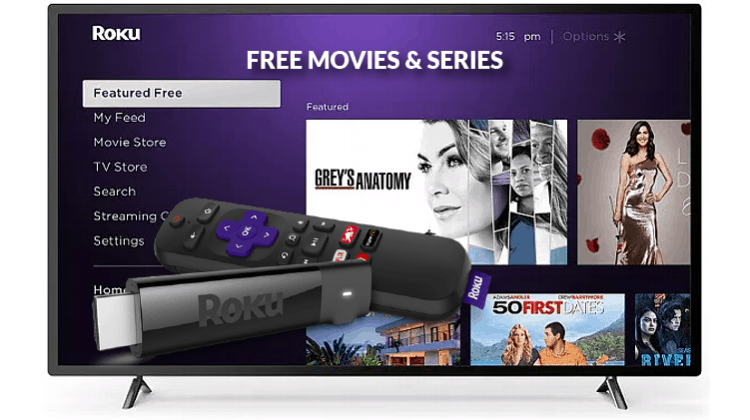
Roku is similar to Firestick/Fire TV; with Roku, you can stream movies and series right into your TV! All you need is the Roku streaming player and you’re good to go; this article is a guide to Watch Free Movies and Series on Roku
Guide to Watch Free Movies and Series on Roku streaming player

Bestdroidplayer.com is a reader-supported blog. If you buy a VPN or an Amazon product through our links, we may earn a commission that helps maintaining our blog. Our reviews are totally honest and we only recommend trusted VPN and ecommerce brands. Full affiliate disclosure

Contents hide
1. What is Roku?
2. Protect Yourself! Get a VPN
3. Top Ways You Can Watch Free Movies & Series on Roku
4. Conclusion

Roku is a wonderful streaming device that helps you to watch free movies, series and virtually all other forms of entertainment media. With Roku, you can quite literally stream as much content as you want. All you have to do is access one of the many hundreds of channels available; then you’ll be able to watch movies free of charge! But of course, in order to do so, you need to know the right channels. This article is to talk about some great channels which you can access to view free movies and series.

Before we move on this Guide to Watch Free Movies and Series on Roku, let’s start off with the basics.

What is Roku?

If you’re one of the few people who’ve stumbled across this article in the hopes of looking for some kind of software or streaming service that will allow you to stream movies series for free, then you’re in luck! Roku is exactly what you need! With Roku, you can stream movies and series right into your TV! All you need is the Roku streaming player and you’re good to go. Available in stick format (similar to the Firestick) or as larger devices; you can add channels to access the content of your choice. In order to view the content you want, you just need to know the right channel.

Also is important to talk about privacy and security protection, before go on with this Guide to Watch Free Movies and Series on Roku.

Protect Yourself! Get a VPN

Almost everything we do today is centered online. Even Roku depends on the internet to load movies and series that you can watch for free. Because of this, there’s a serious threat of your privacy online being threatened by people with less than good intentions. However, to be fair, it’s not just hackers you need to be worried about. Some governments have put special laws in place as a means to monitor people. Others have stricter laws that don’t allow you to watch certain content online. If you’re in such a region, then we seriously advise you to use a VPN.

It’s a perfectly legal way of watching content not available in your part of the world. But that’s not the only use of VPNs. You can use VPNs for much more than that. For, in spite of Roku’s best efforts to make sure that all the streaming content is official, some countries have very strict laws, mostly due to things like government censorship. Such issues are entirely political in nature but citizens do get punished for it. In order to prevent such a thing happening to you (if you live in such a region that is), a VPN might be a good choice. Not just for Roku but for whenever you decide to use the internet. VPNs can help overcome restrictions on websites as well so it’s definitely a good idea to get one for yourself.

Our recomendation

As for suggestions, we recommend using IPVanish as your go-to VPN. It’s a paid, subscription-based service- mind you- but we prefer it over other VPNs available for free because of how great it is. IPVanish is the best VPN for Roku.

IPVanish holds the title of the world’s best VPN service. You can fact check that! It is the best VPN service available and there are many reasons for this. For one, it has a great 24/7 support service that’s there at your beck and call whenever you need any help. Secondly, and this is what got us hooked to IPVanish, is the fact that it has a no logging policy. What does this mean? Well, it means that once you’ve turned on this VPN, no matter what you Google, from where ever in the world, there will be no record of it. Yes, we’re serious. There is no back door, a central server that records all your web history with IPVanish. This way no one will ever be able to find out what you do online so you’re safe from hackers and other regulating bodies. It’s really good for protecting your privacy online. You can find more details on IPVanish from there website.

For all these reasons We managed to get an exclusive 81% of IPVanish.

Save 81% of IPVanish now!

Now we’re done with this intro and advice, let’s to talk about…

Top Ways You Can Watch Free Movies & Series on Roku

Roku has channels that offer a subscription-based viewing service. Such channels include Netflix and other such companies. This is great but it can be quite costly and sometimes the costs of “cutting the cord” equal the costs of staying with cable. This is why some of the other free channels are worth looking at – however, when you use these channels it’s imperative that you use a VPN as often these channels provide access to copyright content.  Here’s our list of the top free channels you can use watch movies and series on Roku.

  1. Crackle

This channel includes the essentials; full-length, feature films, TV series and even programs available on your local show sorted out into your favorite genre. From sci-fi to horror to romance, you can find all sorts of movies and series according to your taste. Crackle is proud to show content that hasn’t been pirated or picked up from some D-list website; so you can expect quality content for sure! You can download Crackle from the Roku Store. You can find out some more information on Crackle here.

Sign up to our newsletter to receive guides and cord-cutting tips for free.
  1. Tubi TV

The Tubi TV channel on Roku is a free television channel that allows you to view exclusive Hollywood content for free. It has one of the largest collections of movies and TV shows available on the platform and you can easily find all of your favorite Hollywood movies and TV shows here.

  1. OVGuide

For fans of OVGuide, you’ll be happy to learn that OVGuide is available on Roku. You can find it on the Roku Store and enjoy over thousands of free movies and TV shows from across the continent in your native language as well! Content is added daily to this platform and you don’t need to pay anything or even have a subscription to access this. If this isn’t a deal then we don’t know what is!

  1. PlutoTV

Pluto TV is available on RokuPlutoTV will serve as an extension of your cable TV network if you install this from the Roku Store. Why? Well, that’s because it is kind of like an internet TV. You can access movies, TV shows, sports, news, and even live events through PlutoTV. In addition, you can expect to view your favorite news sources such as podcasts and even some YouTube channels- all for free! You can find more information about PlutoTV here also.

  1. Popcornflix

Popcornflix Roku Channel has all sorts of entertainment content available on its platform; includes movies, documentaries, foreign films, web series and also cable TV series. It also includes indie movies from young, up-and-coming directors and producers as well so you’ll be one of the first people to see the talents of tomorrow’s filmmakers!

These were some of the channels which you can access to view content such as movies and series on your Roku device. The installation process for all of these channels is pretty simple: all you have to do is go to the Roku Store and search these channels and install them! It’s really that simple.

Conclusion

So that’s about it- here’s our list of channels that will allow you to Watch Free Movies and Series on Roku. We hope you liked it and that you will consider our strong advice and get a VPN to compliment your Roku experience as well!

Have a great day!

 

👋 Signup to our newsletter to receive guides and cord-cutting-tips tips for FREE!! Click Here!


Marketing permission: I give my consent to BestDroidPlayer to be in touch with me via email using the information I have provided in this form for the purpose of news, updates and marketing.

Legal disclaimer

BestDroidPlayer.com is in no way affiliated to any streaming application, apk or its addons. Also, we are not associated with the brands here shown as the references are only informative. Bestdroidplayer.com does not verify the legality or security of any apps, apks, addons or services mentioned on this site. We DO NOT HOST any copyright-protected software or streams and we DO NOT broadcast or provide any copyright-protected streams on this website - The content here provided is only informational and it should be used only to access content that is not protected by copyright. We strongly advise our readers to avoid piracy at all costs, if you decide to do so, it is your responsibility - We are not responsible for any of your activities.

If you wish to make a claim, please check our DMCA Notice Policy.

Affiliate disclosure: Bestdroidplayer.com is a reader-supported blog. If you buy a VPN or an Amazon product through our links, we may earn a commission that helps maintaining our blog. Our reviews are totally honest and we only recommend trusted VPN and ecommerce brands.

Filed Under: Streaming Apps Tagged With: free movies, free movies and series, roku, Roku Channels

Related guides

  • Streaming Apps

    How to Install Perfect Player IPTV APK on FireStick and Android TV

    7 October 2020

  • From the Community

    The Online Slot Features Driving Player Engagement in South Africa

    17 July 2026

  • Tech

    Have the Most Popular New Video Game Releases All Been Single Player So Far in 2023?

    12 July 2023

  • Tech

    Player Behavior in Mobile Casinos: An In-Depth Analysis

    12 July 2023

  • Tech

    Movies and Series: Best Showtime Series

    20 March 2023

  • Streaming devices

    How to Setup a VPN on Roku (Most Popular VPNs for Roku TV 2024)

    1 January 2024

Reader Interactions

Comments

  1. Harold says

    9th November 2018 at 1:18 pm

    Great points mentioned in the article. I use a VPN to protect my privacy while I’m watching Roku.

Leave a Reply

Your email address will not be published. Required fields are marked *

This site uses Akismet to reduce spam. Learn how your comment data is processed.

Primary Sidebar

Search

Follow us

  • Facebook
  • Pinterest
  • Twitter

Featured Posts

Kodi Setup Guide

Most Complete Kodi Setup Guide: All you need to know to use Kodi

Latest Articles

BestDroidplayer article image about VPN issues on Firestick with TV screen and remote.

VPN Not Working on Firestick? 8 Easy Ways to Fix It

4th November 2026 By bestdroidplayer

BestDroidplayer Free99 movie app interface screenshot.

How to Install Free99 Kodi Addon (2026 Guide)

3rd November 2026 By bestdroidplayer

AI video editing scene with 3D character on monitor for streaming.

How 3D Assets Can Improve AI Video and Streaming Content

3rd November 2026 By bestdroidplayer

Person holding smartphone with eSIM app in front of Rome skyline.

What to Compare Before Buying an eSIM Data Plan in Europe

23rd October 2026 By bestdroidplayer

bestdroidplayer

Tested guides for Kodi, Fire TV, Android TV and streaming apps, in English, Portuguese and French since 2014.

We host no files and are not affiliated with any app or addon we cover. Only stream content you have the rights to.

Menu

  • Homepage
  • About Us
  • All Posts
  • Bestdroidplayer FAQ
  • DMCA Notice Policy
  • Affiliate Disclosure
  • Disclaimer
  • Privacy Policy
  • Cookie Policy
  • Advertise with us – Banner Ads
  • Get in Touch
  • HTML Sitemap

About Us

Bestdroidplayer it’s a blog with News, Tips, and Tutorials about the streaming industry.
In this blog, you will find useful tips to cut the cord and save some bucks while you get the best streaming experience.

Read more about us here.

Legal Disclaimer

BestDroidPlayer.com is in no way affiliated to any streaming application, apk or its addons. Also,  we are not associated with the brands here shown as the references are only informative. Bestdroidplayer.com does not verify the legality or security of any apps, apks, addons or services mentioned on this site. We DO NOT HOST any copyright-protected software or streams and we DO NOT broadcast or provide any copyright-protected streams on this website – The content here provided is only informational. We strongly advise our readers to avoid piracy at all costs, if you decide to do so, it is your responsability – We are not responsible for any of your activities.

Copyright © 2026 Bestdroidplayer

EnglishPortuguêsFrançais

We value your privacy

We use cookies for statistics (Google Analytics) to see which guides help our readers. You can accept or refuse: the site works the same either way. Cookie policy